EducationSoftwareStrategy.com
StrategyCommunity

Knowledge Base

Product

Community

Knowledge Base

TopicsBrowse ArticlesDeveloper Zone

Product

Download SoftwareProduct DocumentationSecurity Hub

Education

Tutorial VideosSolution GalleryEducation courses

Community

GuidelinesGrandmastersEvents
x_social-icon_white.svglinkedin_social-icon_white.svg
Strategy logoCommunity

© Strategy Inc. All Rights Reserved.

LegalTerms of UsePrivacy Policy
  1. Home
  2. Topics

KB17753: In MicroStrategy Narrowcast Server 9.4.x - 10.x, users are not able to start the Distribution Manager with the error 'Network connection check failed because the host list is empty'


Community Admin

• Strategy


This Knowledge Base article describes an issue in MicroStrategy Narrowcast Server 9.4.x - 10.x that occurs during the Distribution Manager start

 
When users try to start the Distribution Manager in Strategy Narrowcast Server 8.x - 9.0.x, it is not started and in system monitor or DELog, users find the following error messages:


Exception caught while checking network connection :1616:
Network status info: Failed to ping host "xyz" with timeout set to 1000.:6072:
​This DM has lost its connection to the network. Reconnection will be attempted after 10 seconds:1616:

CAUSE
The registry key 'HostListForNetworkConnectionCheck' is not populated correctly or missing.
ACTION
Follow the steps below to check if the registry key 'HostListForNetworkConnectionCheck' exists:

  1. Go to Start > Run and type in 'regedit'.
  2. Browse to:
    1. For 32-bit: HKEY_LOCAL_MACHINE\SOFTWARE\Strategy\Strategy Broadcast Server\7.0\DistributionManager -
    2. For 64-bit: HKEY_LOCAL_MACHINE\SOFTWARE\Wow6432Node\Strategy\Strategy Broadcast Server\7.0\SMTPService
  3. If the key 'HostListForNetworkConnectionCheck' does not exist, add it manually.

To add the key:

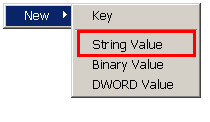
  • Right click and select 'String Value' as shown below:
ka04W000000OaeBQAS_0EM440000002BMc.jpeg
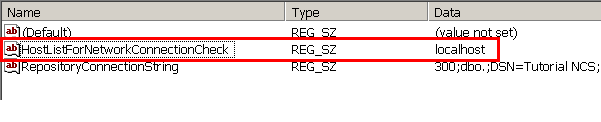
  • Name the key as 'HostListForNetworkConnectionCheck'.
  • Put value 'localhost' in the key, as shown below:
ka04W000000OaeBQAS_0EM440000002BMZ.jpeg

WARNING:
Modifying registry values incorrectly may cause serious, system-wide problems that may require the re-installation of Microsoft Windows NT. Any edit of the registry is done at the user's own risk. Since these are user-initiated changes, they are not covered by any Strategy warranty. If using Microsoft Windows NT, the user should backup the registry and/or update an Emergency Repair Disk (ERD) prior to alterations.
 
17753


Comment

0 comments

Details

Knowledge Article

Published:

June 14, 2017

Last Updated:

March 26, 2018