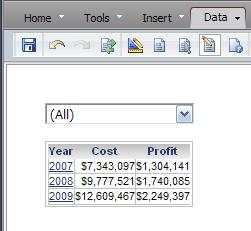
SYMPTOM:
Choosing 'All' in a selector (based off of the Call Center attribute) does not aggregate the data in a grid in Strategy Web 9.4.x. The user sees multiples rows or repeating rows per element, in this case 'Year', as shown below:
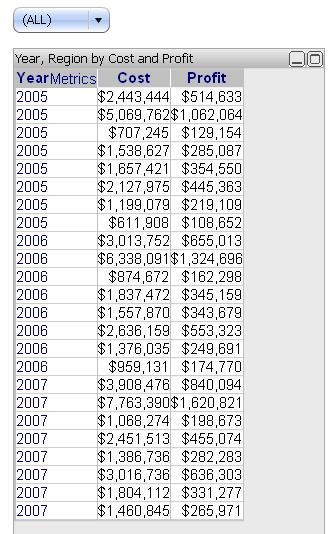
This same scenario occurs when selecting multiple items in a selector as explained in the following Strategy Knowledge Base technical note:
KB17105 (KB5600-81X-2848): When choosing multiple items in a selector, the selections do not get aggregated on the targeted object in Strategy Web 8.1.x
CAUSE:
This behavior is working as designed. The selector limits the results displayed after the XML was created. Since these values are not aggregate in the XML, they are not aggregated on the grid. If the Subcategory attribute is included in the grid, the Year elements will appear to be distinct, one per each Call Center.
ACTION:
This issue has been fixed in Strategy Web 9.0.0 with the introduction of the Total option and in Strategy Web 9.0.1 with the introduction of selectors as filters. Upgrade to any of these versions to take advantage of this fix.
In Strategy Web 9.0.0
Users can utilize the "Total" option in the selector properties, as seen below:
The "ALL" option will still show duplicate values because it displays all the rows for each Call Center (the attribute defined in the selector) for each year, as seen below:
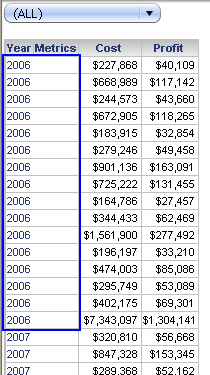
However, with the new "Total" option, users will now see the aggregated values for all Call Centers per year, as seen below:
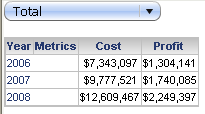
In Strategy Web 9.0.1
Users can utilize the "Apply selection as filter" option in the selector properties, as seen below:
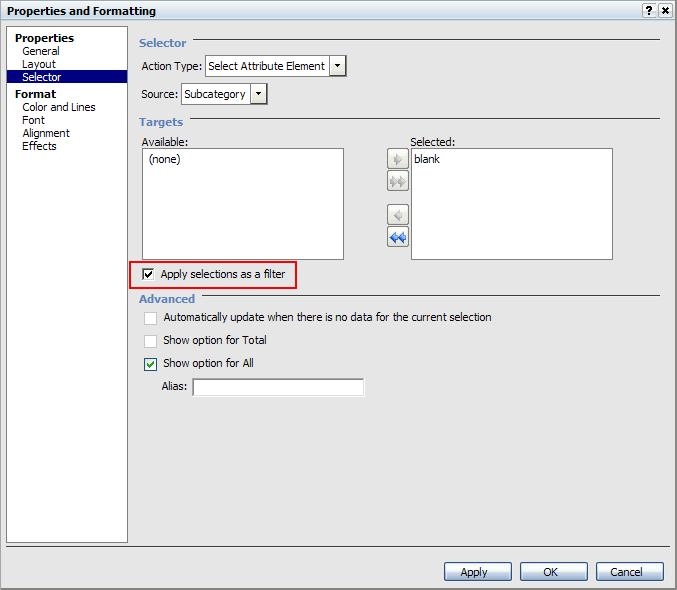
This way, the selection is applied at the XML generation step and the data presented on the grid has been aggregated at the new level. Notce that the Total option is now grayed out because it is not required anymore.