SYMPTOM:
A filter is designed by outer joining a pair of metrics in a report, then using that report as a filtering qualification. This qualification will evaluate to the union of the attribute elements retrieved for both metrics individually.
When using a filtering report of this type, however, the final report may return less data than expected, or no data at all.
For example, if a report in Strategy Tutorial needs to calculate revenue over Movies which sold on January 1 or any items which were received into inventory on January 2, a report-as-filter can be created as follows.
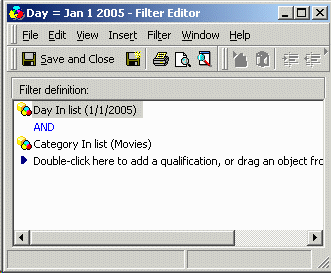

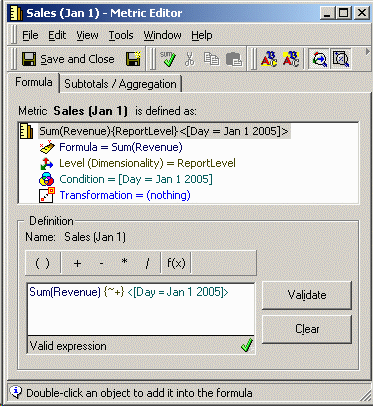
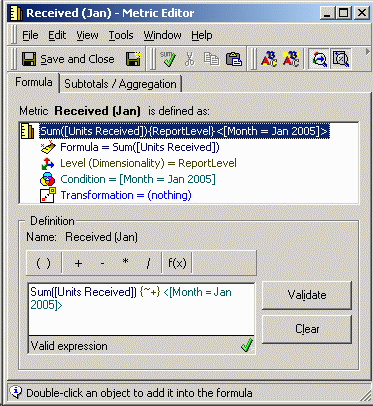


When this report is executed, it returns one item that was received into inventory and several movies that were sold on the specified day. (Only partial results are shown here.)

However, when this report is used as a filter in another report, no data are returned.
CAUSE
When Strategy SQL Generation Engine 9.x-10.x resolves the filtering report as a set qualification, it looks to the join types specified in the metric definitions. The metric join types set in the filtering report's definition (in Report Data Options) are not taken into consideration.
In the above demonstration, the metric join types were not set explicitly in the metric definitions. As a result, the metrics' join types fall back to the project default, which is inner join for Strategy Tutorial. Therefore, SQL is generated for the filtering report using an inner join between the two metrics, and since the metrics have no attribute elements in common, all data are excluded.
select a11.ITEM_ID ITEM_ID,
sum((a11.QTY_SOLD * (a11.UNIT_PRICE - a11.DISCOUNT))) WJXBFS1
into #ZZMD00
from ORDER_DETAIL a11
join LU_ITEM a12
on (a11.ITEM_ID = a12.ITEM_ID)
join LU_SUBCATEG a13
on (a12.SUBCAT_ID = a13.SUBCAT_ID)
where (a11.ORDER_DATE in (CONVERT(datetime, '2005-01-01 00:00:00', 120))
and a13.CATEGORY_ID in (3))
group by a11.ITEM_ID
select a11.ITEM_ID ITEM_ID,
sum(a11.UNITS_RECEIVED) WJXBFS1
into #ZZMD01
from INVENTORY_ORDERS a11
where a11.MONTH_ID in (200501)
group by a11.ITEM_ID
select pa11.ITEM_ID ITEM_ID,
pa11.WJXBFS1 WJXBFS1,
pa12.WJXBFS1 WJXBFS2
into #ZZMQ02
from #ZZMD00 pa11
join #ZZMD01 pa12
on (pa11.ITEM_ID = pa12.ITEM_ID)
select a11.ITEM_ID ITEM_ID,
max(a13.ITEM_NAME) ITEM_NAME,
sum((a11.TOT_DOLLAR_SALES - a11.TOT_COST)) WJXBFS1
from ITEM_MNTH_SLS a11
join #ZZMQ02 pa12
on (a11.ITEM_ID = pa12.ITEM_ID)
join LU_ITEM a13
on (a11.ITEM_ID = a13.ITEM_ID)
group by a11.ITEM_ID
ACTION
Edit the metrics used in the filtering report so that each explicitly calls for an outer join. The setting is reached in the metric editor through the Tools menu > Metric Join Type.
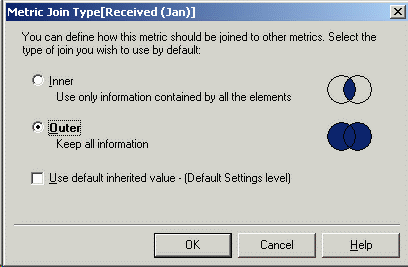
After this change in both metrics, the SQL for the final report will generate with a full outer join where highlighted above, and the expected results will be returned.

