EducationSoftwareStrategy.com
StrategyCommunity

Knowledge Base

Product

Community

Knowledge Base

TopicsBrowse ArticlesDeveloper Zone

Product

Download SoftwareProduct DocumentationSecurity Hub

Education

Tutorial VideosSolution GalleryEducation courses

Community

GuidelinesGrandmastersEvents
x_social-icon_white.svglinkedin_social-icon_white.svg
Strategy logoCommunity

© Strategy Inc. All Rights Reserved.

LegalTerms of UsePrivacy Policy
  1. Home
  2. Topics

KB17790: Ability to select dynamic dates in a prompted filter in MicroStrategy Web 9.2.x


Community Admin

• Strategy


SYMPTOM:
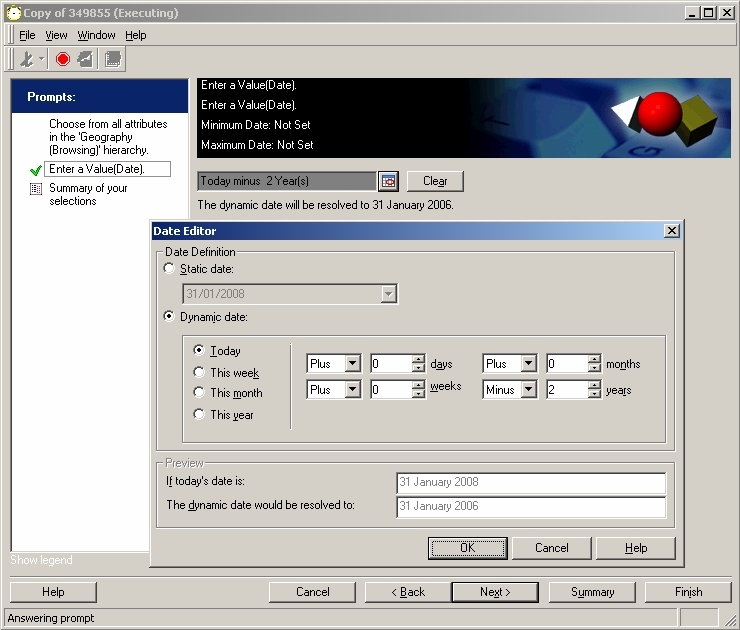
Users may wish to select dynamic dates in a prompted filter through the Strategy Web 9.2.x interface. This can be done in Strategy Desktop 9.2.x using the Date Editor interface, as shown below:
 

ka04W000000Of3yQAC_0EM4400000028dv.jpeg

 
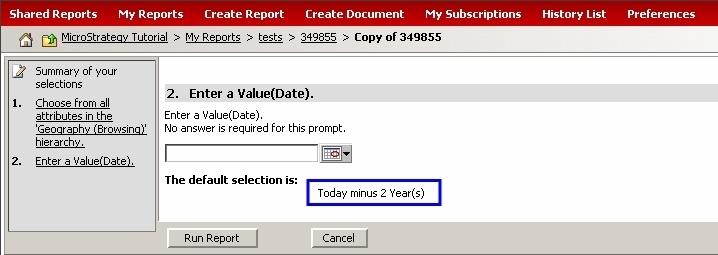
The default dynamic dates selected in Strategy Desktop 9.2.x are carried over to Strategy Web 9.2.x as hard-coded values, as displayed here:
 

ka04W000000Of3yQAC_0EM4400000028ds.jpeg

 
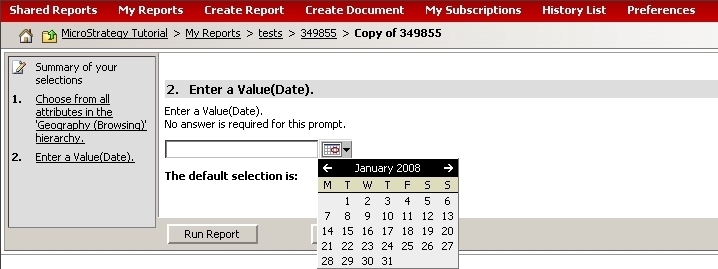
However, when users click on the calendar icon, only static dates can be selected:
 

ka04W000000Of3yQAC_0EM4400000028dt.jpeg

 
It is not currently possible to select dynamic dates in a prompted filter in Strategy Web 9.2.x.
 
ACTION:
An enhancement request exists for the ability to select dynamic dates in a prompted filter through the Strategy Web interface. Contact Strategy Technical Support for an update.


Comment

0 comments

Details

Knowledge Article

Published:

June 12, 2017

Last Updated:

June 12, 2017