EducationSoftwareStrategy.com
StrategyCommunity

Knowledge Base

Product

Community

Knowledge Base

TopicsBrowse ArticlesDeveloper Zone

Product

Download SoftwareProduct DocumentationSecurity Hub

Education

Tutorial VideosSolution GalleryEducation courses

Community

GuidelinesGrandmastersEvents
x_social-icon_white.svglinkedin_social-icon_white.svg
Strategy logoCommunity

© Strategy Inc. All Rights Reserved.

LegalTerms of UsePrivacy Policy
  1. Home
  2. Topics

KB17822: No option to open file when export to CSV from MicroStrategy Web 9.x


Community Admin

• Strategy


No option to open file when export to CSV from MicroStrategy Web 9.x

SYMPTOM:
Execute a report in Strategy Web 9.x and export the report to CSV file. The following window appears which only allow user to save the file:
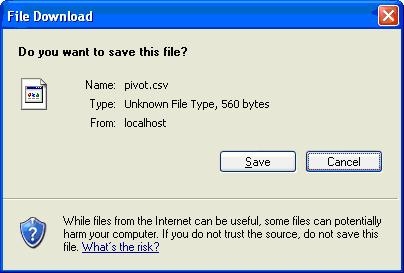
 

ka04W000000OdRLQA0_0EM4400000028dX.jpeg

 
CAUSE:
This is because CSV file type is not defined on the machine.
 
ACTION:
Define the CSV file type on the machine with the following steps:
 

  • Open Windows Explorer > Tools > Folder Options.
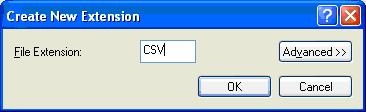
  • Select File Type tab and click New.
  • Type CSV and click OK, as shown below:
ka04W000000OdRLQA0_0EM4400000028dZ.jpeg
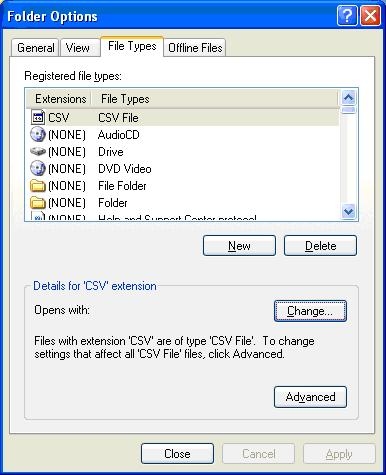
  • Select the newly added file type and click Change, as shown below:
ka04W000000OdRLQA0_0EM4400000028df.jpeg
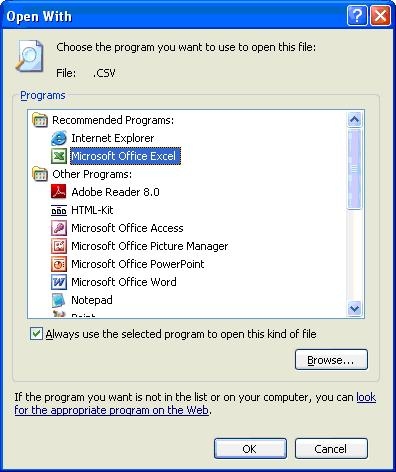
  • Select Microsoft Excel and click OK, as shown below:
ka04W000000OdRLQA0_0EM4400000028dY.jpeg
  • Close Folder Options window.
  • Close all browsers and launch Strategy Web 9.x again.
  • Export the same report and the option to open file will be displayed this time, as shown below:
ka04W000000OdRLQA0_0EM4400000028da.jpeg

NOTE: Folder option is a Windows' Setting and the default behavior may vary from above.


Comment

0 comments

Details

Knowledge Article

Published:

June 22, 2017

Last Updated:

June 22, 2017