SYMPTOM:
For some reporting requirements, it may be necessary to generate an extra column that contains the current date and/or timestamp. Such situations could arise while using datamart reports or any custom SQL reports in Strategy products. The 'CURRENT_TIMESTAMP' function in Oracle would satisfy this requirement.
The Strategy ODBC Driver for Oracle Wire Protocol is shipped with Strategy products to facilitate connectivity to an Oracle database. Users attempt to run a query comprising the 'CURRENT_TIMESTAMP' function through this driver and the following error is encountered:
Execute Query failed. Error type: Odbc error. Odbc operation attempted: SQLExecDirect. Optional feature not implemented.
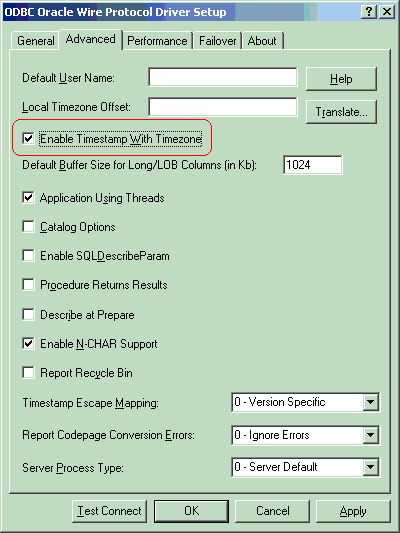
This setting is located in the 'Advanced' tab.
NOTE:
It is strongly recommended to create DSN for the Strategy ODBC Driver for Oracle Wire Protocol using the Strategy Connectivity Configuration Wizard (formerly known as the Strategy ODBC DSN Creator). This tool is accessed from Start > Programs > Strategy > Tools > Connectivity Configuration Wizard. It is recommended that users not use the Microsoft ODBC Data Source Administrator for creating DSNs for the Strategy drivers.
However, the option to specify the 'Enable Timestamp With Timezone' setting does not exist in the Strategy Connectivity Configuration Wizard. Users will need to use the Microsoft ODBC Data Source Administrator to edit the DSN (already created through the Strategy Connectivity Configuration Wizard) to enable this setting. Regardless make sure that the DSN is created Strategy Connectivity Configuration Wizard. Only use the Microsoft ODBC Data Source Administrator in this situation for enabling this setting on the DSN that has already been created through the Strategy Connectivity Configuration Wizard.
The above action is recommended for the Strategy ODBC Driver for Oracle Wire Protocol on Windows. For the Strategy ODBC Driver for Oracle Wire Protocol on Unix, the equivalent recommendation is to set the parameter EnableTimestampWithTimeZone to a value of 1 (default is 0) in the odbc.ini file
Third Party Software Installation:
WARNING:
The third-party product(s) discussed in this technical note is manufactured by vendors independent of Strategy. Strategy makes no warranty, express, implied or otherwise, regarding this product, including its performance or reliability.
