EducationSoftwareStrategy.com
StrategyCommunity

Knowledge Base

Product

Community

Knowledge Base

TopicsBrowse ArticlesDeveloper Zone

Product

Download SoftwareProduct DocumentationSecurity Hub

Education

Tutorial VideosSolution GalleryEducation courses

Community

GuidelinesGrandmastersEvents
x_social-icon_white.svglinkedin_social-icon_white.svg
Strategy logoCommunity

© Strategy Inc. All Rights Reserved.

LegalTerms of UsePrivacy Policy
  1. Home
  2. Topics

KB17863: How to use MicroStrategy Command Manager to grant privileges to users and groups


Community Admin

• Strategy


This article explains how administrators can grant and revoke privileges from users and groups in MicroStrategy Command Manager and provides detailed information on the necessary syntax.

This technical note outlines the syntax and process for granting privileges in Strategy Command Manager
Typically, the syntax for granting privileges in Strategy Command Manager is a combination of the privilege name as referenced from the User Editor.
For example, the syntax for granting the privilege 'Web use design mode' is:
GRANT WEBUSEDESIGNMODE TO USER "TESTER".
The process to grant privileges using Strategy Command Manager is:
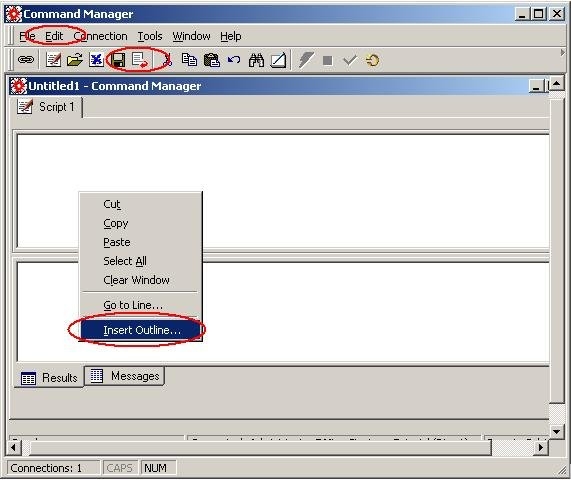
  • Open Strategy Command Manager and connect to the appropriate metadata.
  • Strategy Command Manager includes a complete set of script outlines. These outlines facilitate the script development by providing the command syntax for the instructions submitted to the script executor for object manipulation. There are three ways to load an outline:
ka04W00000148xwQAA_0EM440000002BJz.jpeg
  • There are three outlines which apply to privileges, under the Privilege_Outline folder:
    • Grant Privileges
    • Revoke Privileges
    • Privileges List
  • The privilege list outline will be used in conjunction with either the revoke privileges or the grant privileges outlines. The privilege list will insert a list of privileges into a Strategy Command Manager script.
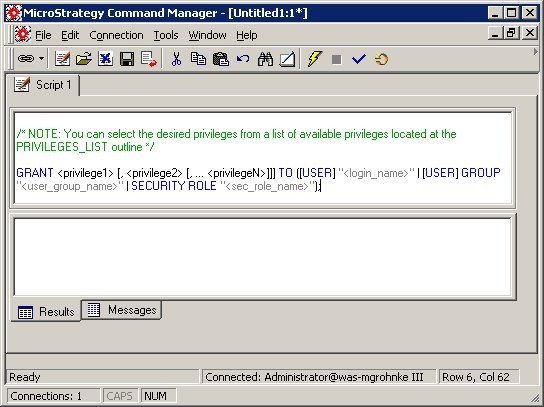
  • Choose the grant privileges outline and click insert, as shown below:
ka04W00000148xwQAA_0EM440000002BJx.jpeg
  • NOTE: Privileges can be applied to either individual users or groups.
     
  • Where the outline specifies "<privilege1> [, <privilege2> [, ... <privilegeN>]]]" is where the privileges to be granted are entered. Delete the "<privilege1> [, <privilege2> [, ... <privilegeN>]]]" portion and leave the cursor in between the words GRANT and TO.
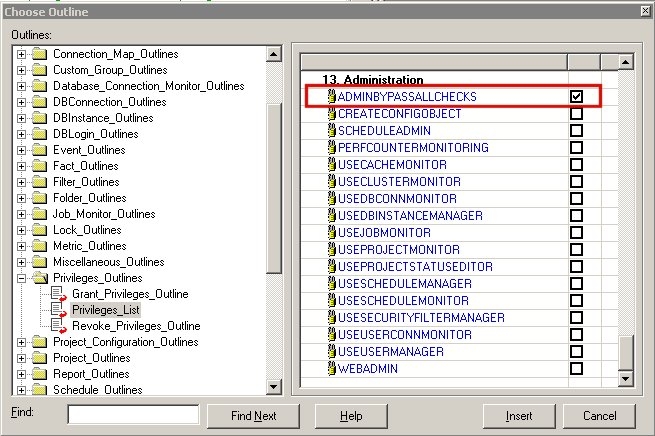
  • Select Edit -> Insert Outline and navigate to the Privileges_Outlines. Select Privilege List. Select the privileges to grant to the user, as shown below:
ka04W00000148xwQAA_0EM440000002BK2.jpeg
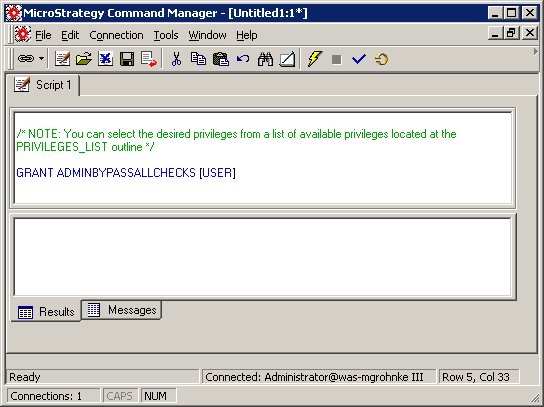
  • In this example, Bypass all security access checks is being granted. Once all the privileges have been selected click Insert, as shown below:
ka04W00000148xwQAA_0EM440000002BK6.jpeg
  • NOTE: The privileges are inserted in the location of the cursor before opening the outline and selecting the privileges.
     
  • Fill in the portion with the username of the user to be edited. Alternatively, replace the with the name of the group to be edited. The script can now be executed to alter the privileges.

For reference a list of all privileges:

  1. Web Reporter
    WEBEXECUTEDOCUMENT
    WEBCHANGEUSEROPTIONS
    WEBCHANGEVIEWMODE
    WEBCREATEEMAILADDRESS
    WEBEXPORT
    WEBEXPORTTOFILENOW
    WEBNORMALDRILLING
    WEBOBJECTSEARCH
    WEBPRINTMODE
    WEBPRINTNOW
    WEBREEXECUTEREPORTAGAINSTWH
    WEBSCHEDULEEMAIL
    WEBSCHEDULEDEXPORTTOFILE
    WEBSCHEDULEDPRINTING
    WEBSCHEDULEREPORT
    WEBSENDNOW
    WEBSORT
    WEBSWITCHPAGEBY
    WEBUSER
    WEBVIEWHISTORYLIST
     
  2. Web Analyst
    WEBMODIFYGRIDLEVELINDOC
    WEBCREATEDERIVEDMETRICS
    WEBNUMBERFORMATTING
    WEBUSEREPORTOBJECTSWINDOW
    WEBUSEVIEWFILTEREDITOR
    WEBADDTOHISTORYLIST
    WEBADVANCEDDRILLING
    WEBALIASOBJECTS
    WEBCHOOSEATTRFORMDISPLAY
    WEBCONFIGURETOOLBARS
    WEBCREATEFILELOCATION
    WEBCREATENEWREPORT
    WEBCREATEPRINTLOCATION
    WEBDRILLONMETRICS
    WEBEXECUTEBULKEXPORT
    WEBEXECDATAMARTREPORTS
    WEBFILTERSELECTIONS
    WEBMANAGEOBJECTS
    WEBMODIFYSUBTOTALS
    WEBPIVOTREPORT
    WEBREPORTDETAILS
    WEBREPORTSQL
    WEBSAVEREPORT
    WEBSAVESHAREDREPORT
    WEBSIMPLEGRAPHFORMATTING
    WEBSIMULTANEOUSEXEC
    WEBUSELOCKEDHEADERS
     
  3. Web Professional
    WEBDOCDESIGN
    WEBMANAGEDOCDATASETS
    WEBDEFINEOLAPCUBEREP
    WEBFORMATGRIDANDGRAPH
    WEBMODIFYREPORTLIST
    WEBSAVETEMPLATEFILTER
    WEBSETCOLUMNWIDTHS
    WEBUSEDESIGNMODE
    WEBUSEREPORTFILTEREDITOR
     
  4. Web MMT Option
    WEBENABLEMMTACCESS
     
  5. Common Privileges
    DRILLWITHINTELLIGENTCUBE
    CREATEAPPOBJECTS
    CREATENEWFOLDER
    CREATESCHEMAOBJECTS
    CREATESHORTCUT
    SCHEDULEREQUEST
    USESERVERCACHE
     
  6. Office
    USEOFFICE
     
  7. Mobile
    USEMSTRMOBILE
    MOBILEVIEWDOCUMENT
     
  8. Desktop Analyst
    CREATEDERIVEDMETRICS
    USEREPORTOBJECTSWINDOW
    USEVIEWFILTEREDITOR
    EXECUTEDOCUMENT
    ALIASOBJECTS
    CHANGEUSERPREFERENCES
    CHOOSEATTRIBUTEDISPLAY
    CONFIGURETOOLBARS
    MODIFYSUBTOTALS
    MODIFYSORTING
    PIVOTREPORT
    REEXECUTEREPORTAGAINSTWH
    SAVECUSTOMAUTOSTYLE
    SENDTOEMAIL
    USEDATAEXPLORER
    USEDESKTOP
    USEGRIDOPTIONS
    USEHISTORYLIST
    USEREPORTDATAOPTIONS
    USEREPORTEDITOR
    USESEARCHEDITOR
    USETHRESHOLDSEDITOR
    VIEWSQL
     
  9. Desktop Designer
    USEDOCUMENTEDITOR
    DEFINEFREEFORMSQLREPORT
    DEFINEOLAPCUBEREPORT
    DEFINEQUERYBUILDERREP
    FORMATGRAPH
    MODIFYREPORTOBJECTLIST
    USECONSOLIDATIONEDITOR
    USECUSTOMGROUPEDITOR
    USEDATAMARTEDITOR
    USEDESIGNMODE
    USEDRILLMAPEDITOR
    USEFINDANDREPLACEDIALOG
    USEFORMATTINGEDITOR
    USEHTMLDOCUMENTEDITOR
    USEMETRICEDITOR
    USEPROJECTDOCUMENTATION
    USEPROMPTEDITOR
    USEREPORTFILTEREDITOR
    USESUBTOTALSEDITOR
    USETEMPLATEEDITOR
    USEVLDBEDITOR
    VIEWETLINFO
     
  10. Architect
    BYPASSSCHEMAACCESSCHECKS
    IMPORTFUNCTION
    IMPORTOLAPCUBE
    USEARCHITECTEDITORS
     
  11. Strategy Administrator
    USECOMMANDMANAGER
    USEOBJECTMANAGER
     
  12. Integrity Manager
    USEINTEGRITYMANAGER
     
  13. Administration
    ADMINBYPASSALLCHECKS
    CREATECONFIGOBJECT
    SCHEDULEADMIN
    PERFCOUNTERMONITORING
    USECACHEMONITOR
    USECLUSTERMONITOR
    USEDBCONNMONITOR
    USEDBINSTANCEMANAGER
    USEJOBMONITOR
    USEPROJECTMONITOR
    USEPROJECTSTATUSEDITOR
    USESCHEDULEMANAGER
    USESCHEDULEMONITOR
    USESECURITYFILTERMANAGER
    USEUSERCONNMONITOR
    USEUSERMANAGER
    WEBADMIN

Comment

0 comments

Details

Knowledge Article

Published:

June 9, 2017

Last Updated:

November 3, 2019