EducationSoftwareStrategy.com
StrategyCommunity

Knowledge Base

Product

Community

Knowledge Base

TopicsBrowse ArticlesDeveloper Zone

Product

Download SoftwareProduct DocumentationSecurity Hub

Education

Tutorial VideosSolution GalleryEducation courses

Community

GuidelinesGrandmastersEvents
x_social-icon_white.svglinkedin_social-icon_white.svg
Strategy logoCommunity

© Strategy Inc. All Rights Reserved.

LegalTerms of UsePrivacy Policy
  1. Home
  2. Topics

KB17891: How to display username on the report grid with MicroStrategy Developer 9.4.1/10.x


Stefan Zepeda

Salesforce Solutions Architect • Strategy


This article describes how to display username on the report grid with MicroStrategy Developer 9.4.1/10.x

When a security filter is used, different users get different report results when the same report is being executed, hence there might be a need to include the name of the user who generated the report in the grid to differentiate the reports. This could be achieved by making use of the system prompt which is available from Strategy Developer 9.4.1/10.x.
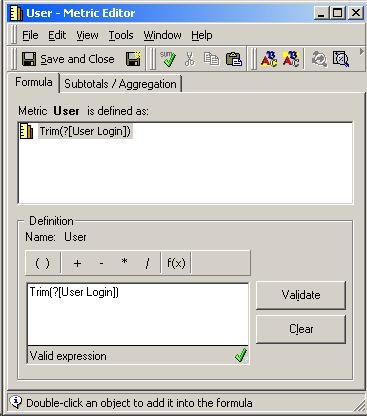
 

  • Create a new metric named User. In the metric, define the following:
ka02R000000kZvnQAE_0EM440000002ExK.jpeg
  •  
    Trim(?)
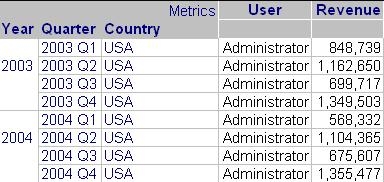
  • Add the above metric onto the report grid. Result is as follows:
ka02R000000kZvnQAE_0EM440000002ExM.jpeg

Note: Some other metric must also be on this report; i.e. this username metric cannot be the only one of the report.


Comment

0 comments

Details

Knowledge Article

Published:

June 2, 2017

Last Updated:

June 2, 2017