EducationSoftwareStrategy.com
StrategyCommunity

Knowledge Base

Product

Community

Knowledge Base

TopicsBrowse ArticlesDeveloper Zone

Product

Download SoftwareProduct DocumentationSecurity Hub

Education

Tutorial VideosSolution GalleryEducation courses

Community

GuidelinesGrandmastersEvents
x_social-icon_white.svglinkedin_social-icon_white.svg
Strategy logoCommunity

© Strategy Inc. All Rights Reserved.

LegalTerms of UsePrivacy Policy
  1. Home
  2. Topics

KB17894: How to create rolling time attributes that display the last 12 months as years in Microstrategy Developer 9.x


Stefan Zepeda

Salesforce Solutions Architect • Strategy


This technical article outlines the steps to create rolling time attributes in MicroStrategy Developer 9.x

If a user needs to display blocks of 12 months as years by specifying the end month at run time there is a way of doing it by following the steps below:
1. Create a date prompt in Strategy Tutorial.
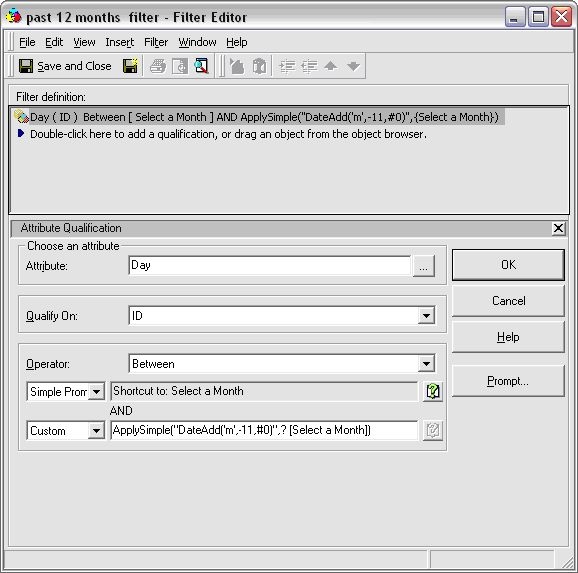
2. Put this prompt into a filter with the following definition:
ka02R000000kXAqQAM_0EM440000002Ewx.jpeg

 
ApplySimple("DateAdd('m',-11,#0)",{Select a Month}).
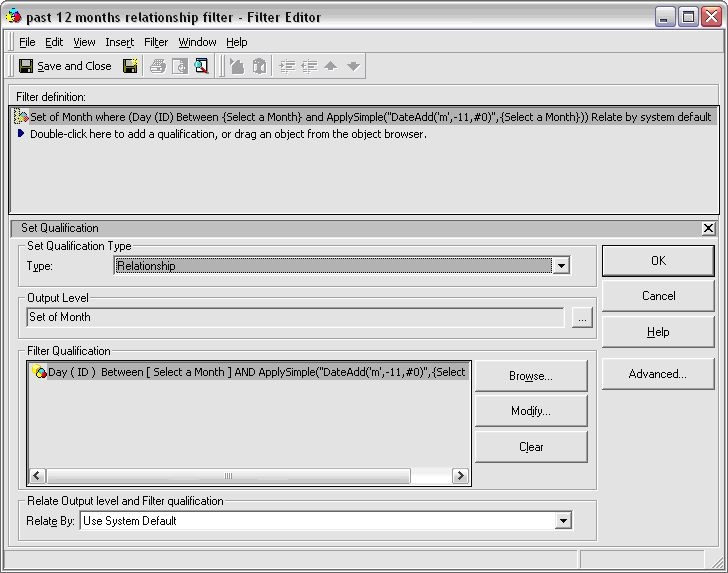
3. Create a Relationship filter as follows:
 

ka02R000000kXAqQAM_0EM440000002Ewi.jpeg

 
Set of Month where (Day (ID) between {Select a Month} and ApplySimple("DateAdd('m',-11,#0)",{Select a Month})) Relate by System Default
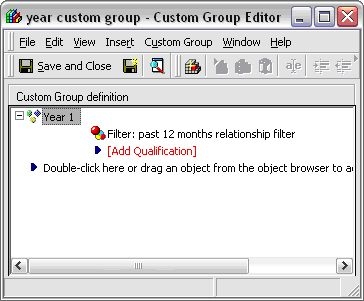
4. Create a Custom Group Element using the Relationship filter created in step 3:
 

ka02R000000kXAqQAM_0EM440000002Ewz.jpeg

 
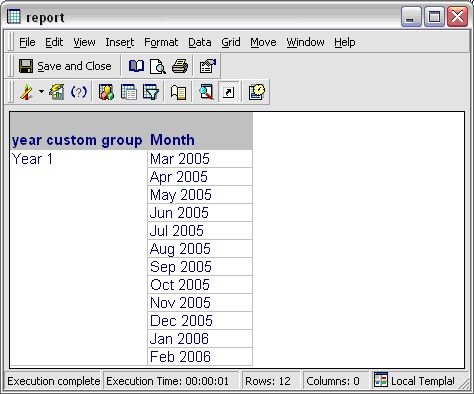
5. Create a report with the custom group and attribute Month. Execute the report with a prompt selection of 2/12/2006. The results of the report are:
 

ka02R000000kXAqQAM_0EM440000002Ewv.jpeg

 
Notes:
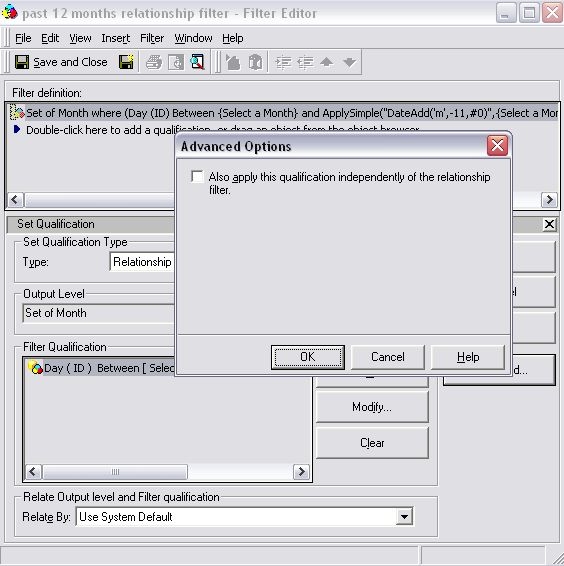
The Relationship filter can be applied directly to the custom group. To do this, select Advanced when editing the Relationship filter and uncheck the box `Also apply this qualification independently of the relationship filter`.
 

ka02R000000kXAqQAM_0EM440000002Ex1.jpeg


Comment

0 comments

Details

Knowledge Article

Published:

April 6, 2017

Last Updated:

April 6, 2017