This example uses the Strategy Tutorial project.
Consider a report with the Quarter and Day attributes, the metric Revenue and filtered on Year = 2006, as shown below:

The report generates the following SQL:
select a12.QUARTER_ID QUARTER_ID,
max(a13.QUARTER_DESC) QUARTER_DESC,
a11.DAY_DATE DAY_DATE,
sum(a11.TOT_DOLLAR_SALES) Revenue
from DAY_CTR_SLS a11
join LU_DAY a12
on (a11.DAY_DATE = a12.DAY_DATE)
join LU_QUARTER a13
on (a12.QUARTER_ID = a13.QUARTER_ID)
where a12.YEAR_ID in (2006)
group by a12.QUARTER_ID,
a11.DAY_DATE
Note that the Where clause is evaluating the filter (Year = 2006) by performing a comparison against LU_DATE, which is a larger table than LU_QUARTER. In most databases, keeping filter qualifications as "close" as possible to the fact table (in terms of join paths) yields optimal performance. However, some databases may execute the query more efficiently if the filter is instead qualified against LU_QUARTER.
To force the Engine to compare against LU_QUARTER, users can use relationship filtering to force the query into two passes.
To accomplish this, replace the existing filter from Year In List (2006) filter with a relationship filter by following the steps below:

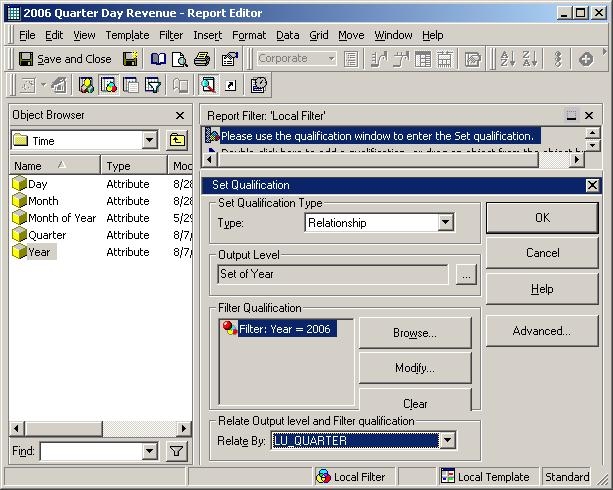
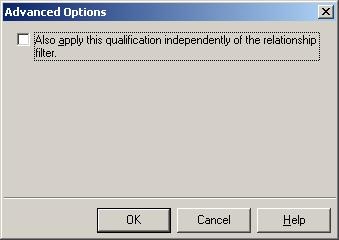
After running the report with the new filter, the SQL appears as follows:
select a12.QUARTER_ID QUARTER_ID,
max(a13.QUARTER_DESC) QUARTER_DESC,
a11.DAY_DATE DAY_DATE,
sum(a11.TOT_DOLLAR_SALES) Revenue
from DAY_CTR_SLS a11
join LU_DAY a12
on (a11.DAY_DATE = a12.DAY_DATE)
join LU_QUARTER a13
on (a12.QUARTER_ID = a13.QUARTER_ID)
where ((a12.YEAR_ID)
in (select r11.YEAR_ID
from LU_QUARTER r11
where r11.YEAR_ID in (2006)))
group by a12.QUARTER_ID,
a11.DAY_DATE
Note that the filter qualification now occurs in a subquery and is performed against the smaller LU_QUARTER table.
|
|
select a12.QUARTER_ID QUARTER_ID, | select a12.QUARTER_ID QUARTER_ID, |
