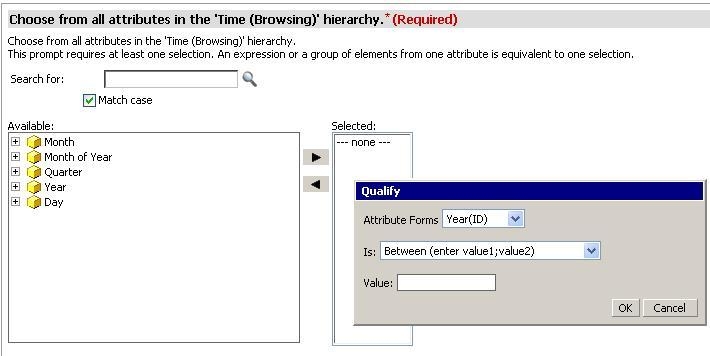
When double-clicking on one of the attributes of a hierarchy prompt in Strategy Web 10.x, a pop-up window will emerge in order to give the user the possibility to qualify any of the attribute forms based on a typed value, as shown below:
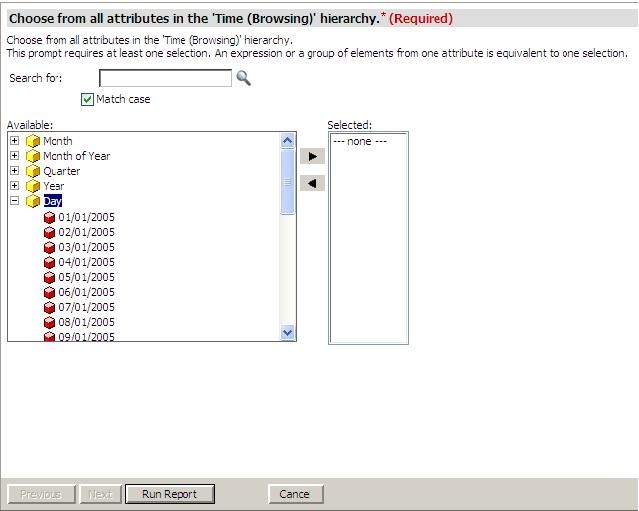
However, it is possible to disable this pop-up window so when users double-click on the attribute it gets expanded showing all its elements allowing the user to move them to the right hand side and answer the prompt in this way, as shown below:
In order to get this, a customization must be done in Strategy Web 10.x. Follow the steps below:
Customization Warning:
This customization is provided as a convenience to Strategy users and is only directly applicable to the version stated. While this code may apply to other releases directly, Strategy Technical Support makes no guarantees that the code provided will apply to any future or previous builds. In the event of a code change in future builds, Strategy Technical Support makes no guarantee that an updated version of this particular customization will be provided. For enhancements to this customization or to incorporate similar functionality into other versions, contact your Account Executive to inquire about Strategy Consulting assistance.
