EducationSoftwareStrategy.com
StrategyCommunity

Knowledge Base

Product

Community

Knowledge Base

TopicsBrowse ArticlesDeveloper Zone

Product

Download SoftwareProduct DocumentationSecurity Hub

Education

Tutorial VideosSolution GalleryEducation courses

Community

GuidelinesGrandmastersEvents
x_social-icon_white.svglinkedin_social-icon_white.svg
Strategy logoCommunity

© Strategy Inc. All Rights Reserved.

LegalTerms of UsePrivacy Policy
  1. Home
  2. Topics

KB180225: How to modify the Load Balancing Factor setting in MicroStrategy Web


Community Admin

• Strategy


This Article explains how to change the load balancing factor setting in MicroStrategy Web.

This Article explains how to change the load balancing factor setting in Strategy Web. To understand the effects of modifying this change please refer to the following:
 
KB4759 : Strategy Intelligence Server cluster load balancing FAQ
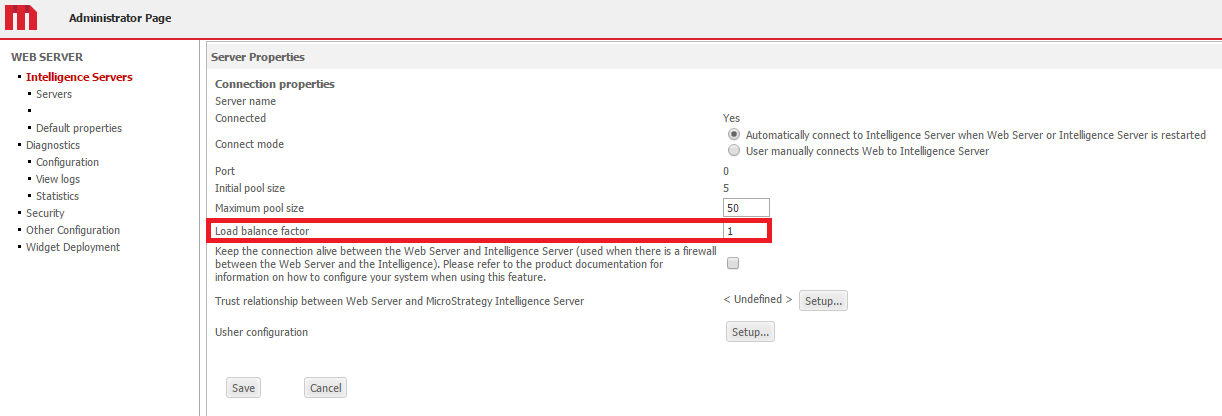
This setting can be modified from the Strategy Web Administrator page "Load Balancing Factor" under the Server Properties. Note that it doesn't require to do a re-start of Web Application Server or Web Server
 

ka04W00000148jWQAQ_0EM440000002Jzh.png

 
After modifying the setting any new connections made from a client to Strategy Web that require generate a new session with the Intelligence Server will make use of the new parameter.


Comment

0 comments

Details

Knowledge Article

Published:

April 25, 2017

Last Updated:

April 25, 2017