When using the URL API to execute a report in Strategy Web 9.x, the URL parameters are exposed in the address bar. Normally the user uses the GET method to pass the parameters to Strategy Web 9.x. The POST method allows the user to hide the parameters that the Web server needs.
The following examples show the differences between the methods and how to execute a report using the URL API with POST and GET methods.
GET Method
This is the HTML page that the user normally uses to execute a report with URL API.
<html>
<body>
<a href="http://localhost/Strategy/asp/Main.aspx?evt=4001&src=Main.asp.4001&reportViewMode=1&reportID=FFC0264D48D6EB6518411C8F34794D7D&server=localhost
&project=Strategy+Tutorial&uid=Administrator&pwd=">Strategy Report GET</a>
</body>
</html>
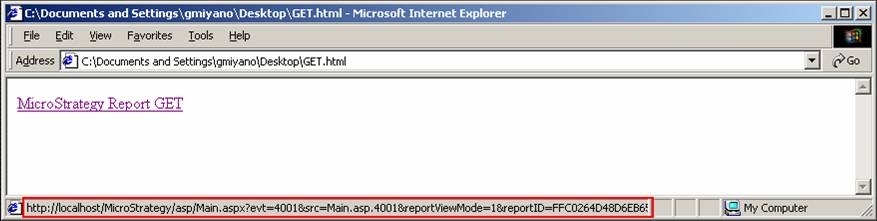
Notice how the parameters that are used for the Web server are exposed to the user.
POST Method
This is an example HTML page that a user can use to execute a report with URL API using the POST method.
<html>
<body>
<script language="javascript">
function runReport()
{
document.mstr.submit();
}
</script>
<form name="mstr" action="http://localhost/Strategy/asp/Main.aspx" method="post">
<input type="hidden" name="evt" value="4001" />
<input type="hidden" name="src" value="Main.aspx.4001" />
<input type="hidden" name="reportViewMode" value="1" />
<input type="hidden" name="reportID" value="FFC0264D48D6EB6518411C8F34794D7D" />
<input type="hidden" name="server" value="localhost" />
<input type="hidden" name="project" value="Strategy Tutorial" />
<input type="hidden" name="uid" value="administrator" />
<input type="hidden" name="pwd" value="" />
</form>
<a href="javascript:runReport();">Strategy Report POST</a>
</body>
</html>
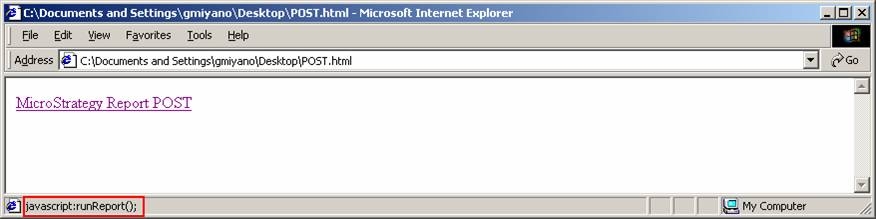
Notice how in the second example the parameters that are passed to the web server are hidden to the end user.
Customization Warning:
This customization is provided as a convenience to Strategy users and is only directly applicable to the version stated. While this code may apply to other releases directly, Strategy Technical Support makes no guarantees that the code provided will apply to any future or previous builds. In the event of a code change in future builds, Strategy Technical Support makes no guarantee that an updated version of this particular customization will be provided. For enhancements to this customization or to incorporate similar functionality into other versions, contact your Account Executive to inquire about Strategy Consulting assistance.
