EducationSoftwareStrategy.com
StrategyCommunity

Knowledge Base

Product

Community

Knowledge Base

TopicsBrowse ArticlesDeveloper Zone

Product

Download SoftwareProduct DocumentationSecurity Hub

Education

Tutorial VideosSolution GalleryEducation courses

Community

GuidelinesGrandmastersEvents
x_social-icon_white.svglinkedin_social-icon_white.svg
Strategy logoCommunity

© Strategy Inc. All Rights Reserved.

LegalTerms of UsePrivacy Policy
  1. Home
  2. Topics

KB18034: 'Configuration object 'CASTOR_SERVER_CONFIGURATION' with ID 'XXXX' cannot be modified because it is locked by ‘USER’ on ‘MACHINE’ since mm/dd/yyyy h:mm:ss’ error occurs when executing a script in MicroStrategy Command Manager


Community Admin

• Strategy


: 'Configuration object 'CASTOR_SERVER_CONFIGURATION' with ID 'XXXX' cannot be modified because it is locked by ‘USER’ on ‘MACHINE’ since mm/dd/yyyy h:mm:ss’ error occurs when executing a script in MicroStrategy Command Manager 9.x and 10.x

SYMPTOM:
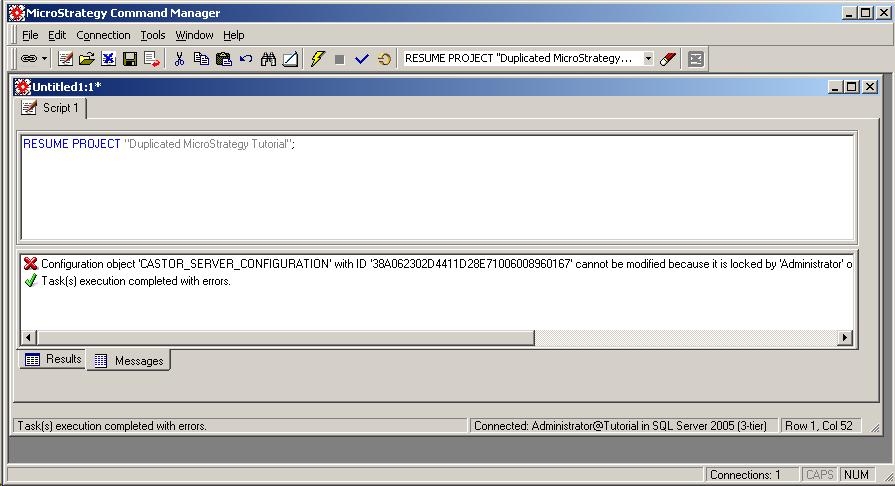
When executing a script in Strategy Command Manager 2021 GA and above, either via the console or through the command line, the following error occurs:
 
Configuration object 'CASTOR_SERVER_CONFIGURATION' with ID 'XXXX' cannot be modified because it is locked by 'USER' on 'MACHINE' since mm/dd/yyyy h:mm:ss. Please contact your administrator for more information.
If the option to log error codes is turned on, the Strategy Command Manager log file will display the full error message as:
 

ka0PW0000002vLZYAY_0EM440000002BLU.jpeg


Exit Code:8 Error Code:-2147213500 Configuration object 'CASTOR_SERVER_CONFIGURATION' with ID 'XXXX' cannot be modified because it is locked by 'USER' on 'MACHINE' since mm/dd/yyyy h:mm:ss. Please contact your administrator for more information.
 
CAUSE:
The Strategy Intelligence Server configuration has been locked by the specific user listed in the error message. No modifications can be made to any project or the server configuration until the user who locked the project, or an administrator, unlocks the configuration.
 
ACTION:
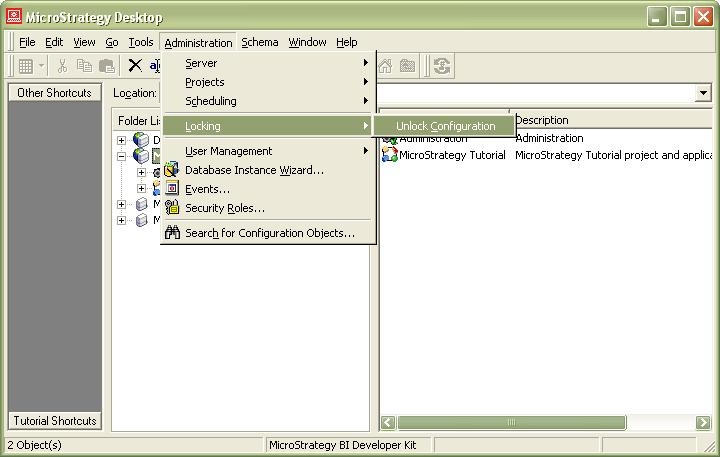
Log in to the Strategy Intelligence Server as either the user in the error message or as an administrator. Go to the Administration menu > Locking > Unlock Configuration, as shown below:
 

ka0PW0000002vLZYAY_0EM440000002BLW.jpeg

 
Alternatively, run the following Strategy Command Manager script as an administrator:


UNLOCK CONFIGURATION FORCE;

The configuration can also be unlocked with Strategy Workstation, by following these steps:
1. Open the Workstation window.
2. Go to Tools > Lock Environment Configuration and Project.
3. Use the search to look for your desired environment configuration or project.
4. Use the Lock toggles to place configuration locks and project locks.
5. Use the Lock All and Unlock All options to lock or unlock all environment configurations and projects.
6. Click Save.
In order to find out more information about this feature, refer to the documentation.


Comment

0 comments

Details

Knowledge Article

Published:

June 3, 2017

Last Updated:

August 9, 2024