EducationSoftwareStrategy.com
StrategyCommunity

Knowledge Base

Product

Community

Knowledge Base

TopicsBrowse ArticlesDeveloper Zone

Product

Download SoftwareProduct DocumentationSecurity Hub

Education

Tutorial VideosSolution GalleryEducation courses

Community

GuidelinesGrandmastersEvents
x_social-icon_white.svglinkedin_social-icon_white.svg
Strategy logoCommunity

© Strategy Inc. All Rights Reserved.

LegalTerms of UsePrivacy Policy
  1. Home
  2. Topics

KB18079: The MCDMProxy.CAdminServiceManager and MCProxy.CProxyConf components are missing from the Windows DCOM configuration in MicroStrategy Narrowcast Server 9.x


Community Admin

• Strategy


The MicroStrategy Narrowcast Server 9.x installation includes two components in the Windows DCOM configuration (DCOMCNFG.exe) necessary for its correct operation. In some cases, these components are missing after a MicroStrategy Narrowcast Server 9.x installation, therefore preventing the system's correct operation.

SYMPTOM:
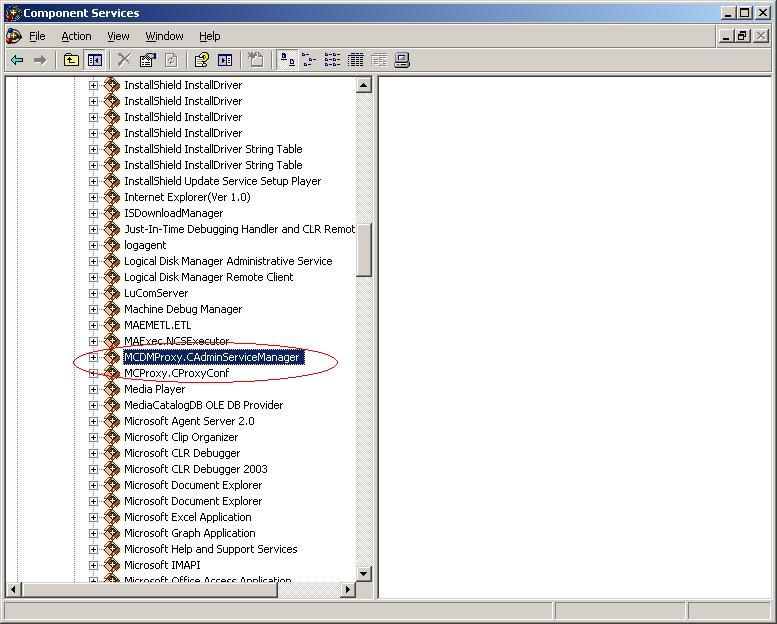
The Strategy Narrowcast Server 9.x installation includes two components in the Windows DCOM configuration (DCOMCNFG.exe) necessary for its correct operation. These are the MCDMProxy.CAdminServiceManager and MCProxy.CProxyConf components.
ka04W000000OeYgQAK_0EM440000002BLH.jpeg

In some cases, these components are missing after a Strategy Narrowcast Server 9.x installation, therefore preventing the system's correct operation.
 
CAUSE:
This is caused by an incomplete installation possibly due to the use of a non-administrative account to install Strategy.
 
ACTION:
In order to fully restore all necessary Strategy Narrowcast Server 9.x components, repair the Strategy installation using an administrative account. After restarting the machine, the MCDMProxy.CAdminServiceManager and MCProxy.CProxyConf components will be available and Strategy Narrowcast Server 9.x will function properly.


Comment

0 comments

Details

Knowledge Article

Published:

June 8, 2017

Last Updated:

June 8, 2017