EducationSoftwareStrategy.com
StrategyCommunity

Knowledge Base

Product

Community

Knowledge Base

TopicsBrowse ArticlesDeveloper Zone

Product

Download SoftwareProduct DocumentationSecurity Hub

Education

Tutorial VideosSolution GalleryEducation courses

Community

GuidelinesGrandmastersEvents
x_social-icon_white.svglinkedin_social-icon_white.svg
Strategy logoCommunity

© Strategy Inc. All Rights Reserved.

LegalTerms of UsePrivacy Policy
  1. Home
  2. Topics

KB18109: Unable to edit advanced qualification in MicroStrategy Developer 9.4.x-10.x


Stefan Zepeda

Salesforce Solutions Architect • Strategy


The 'OK' button and 'Option' drop down menu are greyed out when editing an existing Advanced Qualification

SYMPTOM:
Users open an existing Advanced Qualification to edit it in Strategy Developer 9.4.x-10.x. The 'OK' button and 'Option' drop down menu are greyed out. The defined custom expression cannot be edited, as shown below:

ka02R000000kWxDQAU_0EM440000002EvE.jpeg

 
CAUSE:
There are two possible causes of this issue.
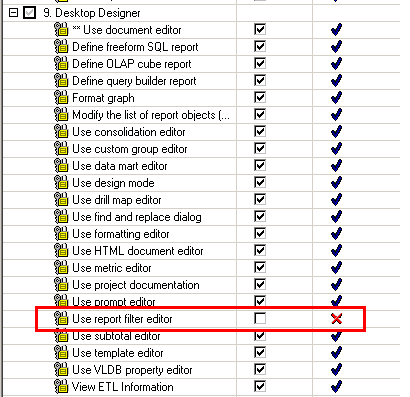
  • The user logged into the project source has not been granted the 'Use report filter editor' privilege, as shown below:
ka02R000000kWxDQAU_0EM440000002EvF.jpeg
  • The 'Show Advanced Qualification' preference has not been enabled, as shown below:
ka02R000000kWxDQAU_0EM440000002EvB.jpeg

ACTION:
To resolve this issue, follow the steps below:

  1. Log into the project source as a user with System Administrator privileges. In the User Manager, grant the 'User report filter editor' privilege to the user facing this issue.
  2. Right-click on the Project name in Strategy Developer 9.4.x-10.x. Go to My Preferences > Editors > Filter Options and check the 'Show advanced qualification' option.

Comment

0 comments

Details

Knowledge Article

Published:

April 13, 2017

Last Updated:

April 13, 2017