SYMPTOM:
While using Strategy Command Manager 9.x and 10.x scripts to create certain objects, Strategy Administrators receive the following error message when using an attribute whose name contains spaces as shown below::
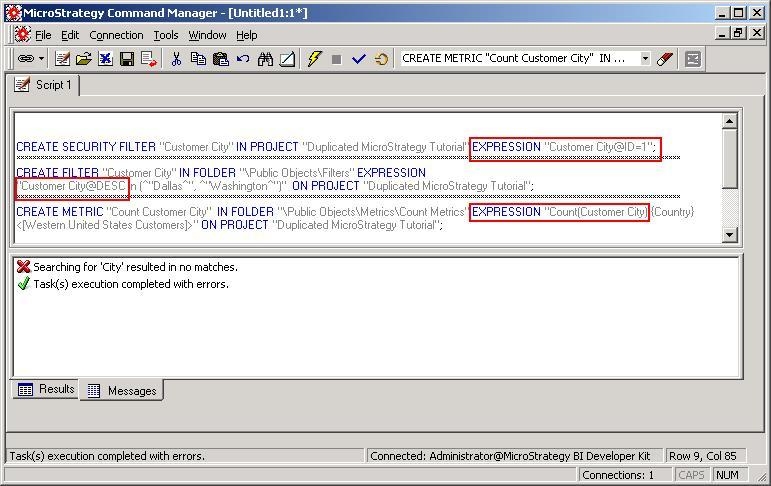
Searching for 'xxxx' resulted in no matches.Task(s) execution completed with errors.
STEPS TO REPRODUCE:
To reproduce the issue with Strategy Tutorial, an Administrative user can run the following Strategy Command Manager 8.x scripts:
CREATE SECURITY FILTER "Customer City" IN PROJECT "Duplicated Strategy Tutorial" EXPRESSION "Customer City@ID=1";
CREATE FILTER "Customer City" IN FOLDER "\Public Objects\Filters" EXPRESSION "Customer City@DESC in (#34;Dallas#34;,#34;Washington#34;)" ON PROJECT "Duplicated Strategy Tutorial";
CREATE METRIC "Count Customer City" IN FOLDER "\Public Objects\Metrics\Count Metrics" EXPRESSION "Count(Customer City) {Country} "<>" ON PROJECT "Duplicated Strategy Tutorial";
CAUSE:
Attribute names that contain spaces cannot simply be used in parameters such with the parametere EXPRESSION example above.
ACTION:
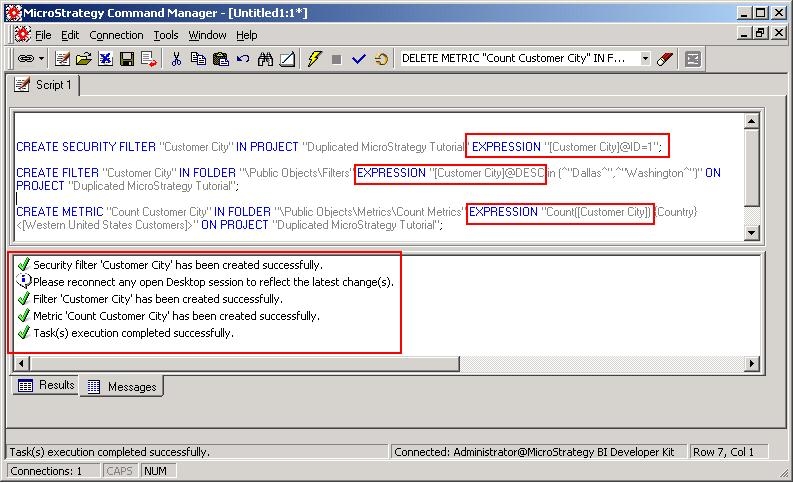
Enclose the attribute names that contain spaces with brackets , as shown below: