EducationSoftwareStrategy.com
StrategyCommunity

Knowledge Base

Product

Community

Knowledge Base

TopicsBrowse ArticlesDeveloper Zone

Product

Download SoftwareProduct DocumentationSecurity Hub

Education

Tutorial VideosSolution GalleryEducation courses

Community

GuidelinesGrandmastersEvents
x_social-icon_white.svglinkedin_social-icon_white.svg
Strategy logoCommunity

© Strategy Inc. All Rights Reserved.

LegalTerms of UsePrivacy Policy
  1. Home
  2. Topics

KB18134: How to change the attachment names when sending the Flash document as an email attachment via MicroStrategy Narrowcast Server 9.x


Community Admin

• Strategy


In Strategy Narrowcast Server 9.x, e-mail attachment names and extensions can be modified via a control document as in older versions of Strategy Narrowcast Server. In the Strategy Narrowcast Server 9.x Administrator:
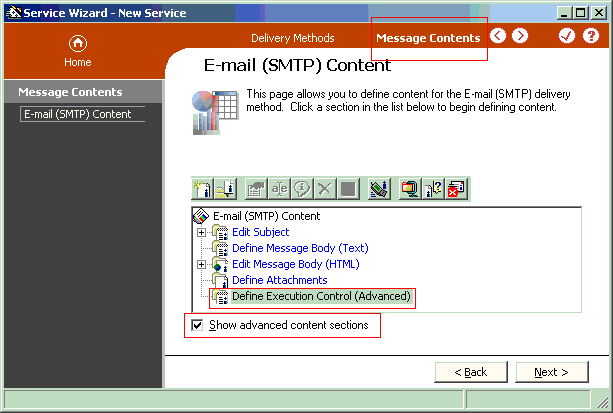
 

  • Select to edit the service with the Service Wizard.
  • Select the Message contents section of the service.
  • Check the option 'Show advanced contents sections' if it's not already checked.
  • Select 'Define Execution Control (Advanced)', as shown below:
ka04W000000OgpcQAC_0EM440000002BJC.gif
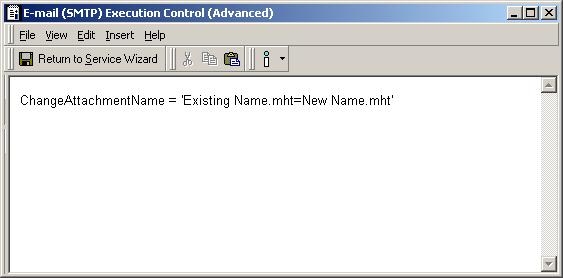
  • To change the name of the Flash document .mht email attachment, the following syntax can be used:
ka04W000000OgpcQAC_0EM440000002BJP.jpeg
  •  

    Where Existing Name is the current name of the .mht attachment and New Name is the name to replace the current.


    Note: The control key word is case sensitive, i.e. ChangeAttachmentName.


Refer to the following Strategy Knowledge Base technical note for more information on additional syntax rules and other type of documents:
 
KB8476 (KB6200-723-0523): How to edit e-mail attachment names and extensions using both static and dynamic content via control documents in Strategy Narrowcast Server 9.x?


Comment

0 comments

Details

Knowledge Article

Published:

June 8, 2017

Last Updated:

June 8, 2017