EducationSoftwareStrategy.com
StrategyCommunity

Knowledge Base

Product

Community

Knowledge Base

TopicsBrowse ArticlesDeveloper Zone

Product

Download SoftwareProduct DocumentationSecurity Hub

Education

Tutorial VideosSolution GalleryEducation courses

Community

GuidelinesGrandmastersEvents
x_social-icon_white.svglinkedin_social-icon_white.svg
Strategy logoCommunity

© Strategy Inc. All Rights Reserved.

LegalTerms of UsePrivacy Policy
  1. Home
  2. Topics

KB18139: How to make new Excel templates with more than 10 pages in MicroStrategy Narrowcast server


Community Admin

• Strategy


There is a menu option in the Narrowcast Server console to allow a user to import a file into the system to be used as a Template. In this case, to be able to import a new Excel file follow the steps in this article.

There is a menu option in the Narrowcast Server console to allow a user to import a file into the system to be used as a Template. In this case, to be able to import a new Excel file follow these steps:
  • Create an Excel file as required.
  • Go to Narrowcast console.
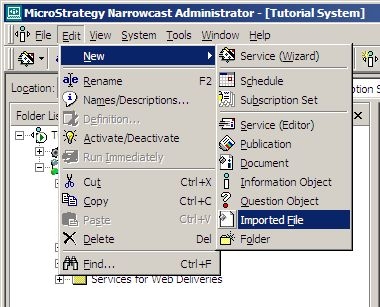
  • Select Edit / New/ Imported file.
ka04W000000OhXHQA0_0EM440000002BLB.jpeg
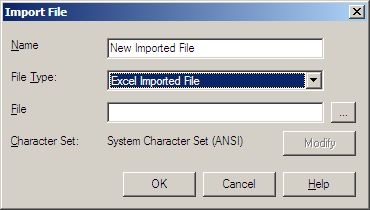
  • Import the file created previously.
ka04W000000OhXHQA0_0EM440000002BLC.jpeg

Once the file is imported it can be used the same way as any of the existing templates.
 
Third Party Software Installation:
WARNING:
The third-party product(s) discussed in this technical note is manufactured by vendors independent of Strategy. Strategy makes no warranty, express, implied or otherwise, regarding this product, including its performance or reliability.


Comment

0 comments

Details

Knowledge Article

Published:

May 16, 2017

Last Updated:

May 16, 2017