EducationSoftwareStrategy.com
StrategyCommunity

Knowledge Base

Product

Community

Knowledge Base

TopicsBrowse ArticlesDeveloper Zone

Product

Download SoftwareProduct DocumentationSecurity Hub

Education

Tutorial VideosSolution GalleryEducation courses

Community

GuidelinesGrandmastersEvents
x_social-icon_white.svglinkedin_social-icon_white.svg
Strategy logoCommunity

© Strategy Inc. All Rights Reserved.

LegalTerms of UsePrivacy Policy
  1. Home
  2. Topics

KB18143: How to reflect schema changes made in a 2-tier project in a 3-tier environment using MicroStrategy


Stefan Zepeda

Salesforce Solutions Architect • Strategy


This article notes how to reflect changes made in 2-tier to 3-tier

In the event that a user makes changes to a project schema in 2-tier while a 3-tier environment is running, do one of the following to synchronize the 3-tier environment with 2-tier:
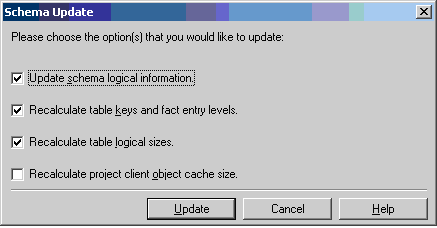
 

  • Update the schema in 2-tier. Restart the Strategy Intelligence Server. This method is recommended and supported by Strategy.
ka02R000000kWLNQA2_0EM440000002VAe.jpeg
  • Update the schema in 2-tier and reload the project from the Project Monitor, as described below:
    • Update the schema in 2-tier.
    • Log into the 3-tier project source.
    • Go to the Project Monitor under Administration, as shown below:
    • In Project Monitor, right-click on the project where changes were made and unload it. Once the project is unloaded, reload it. This can be done only when all the users are logged out.

Strategy does not support users making changes in their 2-tier project source schema if there is a 3-tier project source up and running.


Comment

0 comments

Details

Knowledge Article

Published:

July 18, 2017

Last Updated:

July 18, 2017