EducationSoftwareStrategy.com
StrategyCommunity

Knowledge Base

Product

Community

Knowledge Base

TopicsBrowse ArticlesDeveloper Zone

Product

Download SoftwareProduct DocumentationSecurity Hub

Education

Tutorial VideosSolution GalleryEducation courses

Community

GuidelinesGrandmastersEvents
x_social-icon_white.svglinkedin_social-icon_white.svg
Strategy logoCommunity

© Strategy Inc. All Rights Reserved.

LegalTerms of UsePrivacy Policy
  1. Home
  2. Topics

KB18205: Can users have access to a subfolder Reports In the Shared Reports folder?


Stefan Zepeda

Salesforce Solutions Architect • Strategy


SYMPTOM:

An Administrator does not want users to have access to a parent folder, but would like a user group to have access for one subfolder of the parent folder, e.g. the user cannot see the Shared Reports Folder, but can access a folder within Shared Reports.
 

ACTION:

To grant access to a subfolder, but not the parent folder, follow the steps below:
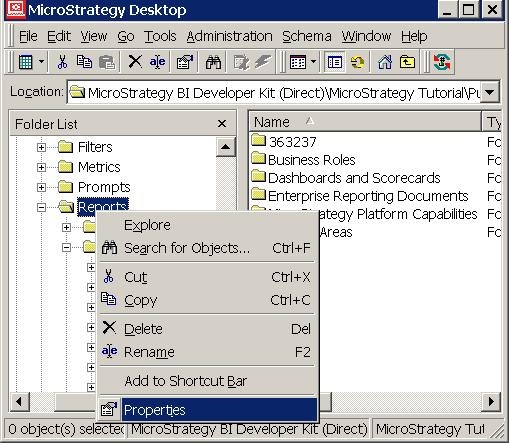
 

  • Right click the parent folder. In this example, the parent folder is the Shared Reports folder.
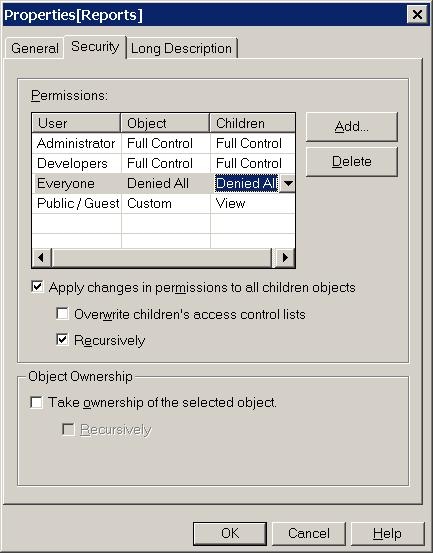
  • Select 'Properties' and open the security tab of its properties dialog box:
ka02R000000kY0pQAE_0EM440000002Esv.jpeg
  • Add the group and set the ACL for the object and the children to be `Deny All`. Select to apply changes in children objects recursively.
ka02R000000kY0pQAE_0EM440000002Esm.jpeg
  • Go to the folder you would like the group to have access to and open up the security tab of its properties dialog box.
  • Select to add a group. The Select User and Groups Dialg box opens. Choose the group and set the Access permission to be `View`:
ka02R000000kY0pQAE_0EM440000002Esk.jpeg
  • Go back to the Shared Reports folder.
  • Remove the group from the groups listed under security.

The users in the group should be able to view only the reports in the selected folder. However, if a new report is added to Shared Reports, they will be able to see it.


Comment

0 comments

Details

Knowledge Article

Published:

June 12, 2017

Last Updated:

June 12, 2017