EducationSoftwareStrategy.com
StrategyCommunity

Knowledge Base

Product

Community

Knowledge Base

TopicsBrowse ArticlesDeveloper Zone

Product

Download SoftwareProduct DocumentationSecurity Hub

Education

Tutorial VideosSolution GalleryEducation courses

Community

GuidelinesGrandmastersEvents
x_social-icon_white.svglinkedin_social-icon_white.svg
Strategy logoCommunity

© Strategy Inc. All Rights Reserved.

LegalTerms of UsePrivacy Policy
  1. Home
  2. Topics

KB18269: 'The job execution time limit set in MicroStrategy Intelligence Server has been exceeded for job XXX. The job was cancelled. User request is cancelled' error message appears after executing a report in MicroStrategy


Community Admin

• Strategy


The following knowledge base article explains the error message reported if hitting the governing setting for Intelligence Server Elapsed Time and how to modify the setting.

SYMPTOM:
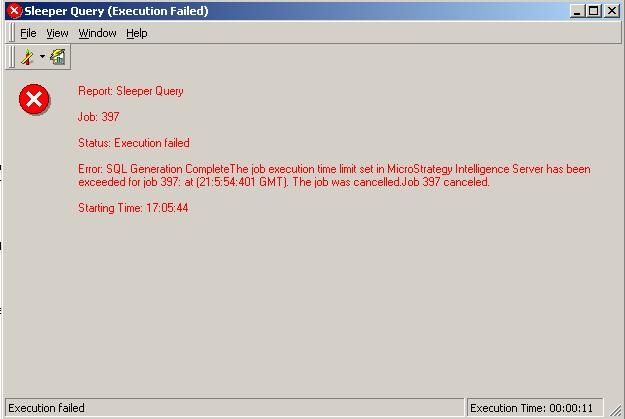
After users execute a report in 3-tier, they may sometimes receive the following error message:
ka0PW0000002yePYAQ_0EM440000002BLr.jpeg


The job execution time limit set in Strategy Intelligence Server has been exceeded for job XXX. The job was cancelled.


If the above report is sent to history, the users see the same error message as seen below:

ka0PW0000002yePYAQ_0EM440000002BLw.jpeg

 
CAUSE:
One cause of this error message is because the above report took longer to execute than the value set for 'Intelligence Server Elapsed Time(sec)' (set at the project level separately for both interactive and scheduled jobs). This setting is accessible via Project Configuration, as shown below:
 

ka0PW0000002yePYAQ_0EM440000002BLt.jpeg

 
This setting includes the following functions:

  1. Time for resolving prompts
  2. Waiting time for users to make prompt selections.
  3. Waiting in job queue for execution
  4. Query Engine executes SQL on the database and the Analytical Engine processes results.

Note: Report Display only shows the Job Execution time and not the Job Queue time.
 
When there are many job requests in Strategy Intelligence Server, it is possible that the time spent waiting in job queue for execution causes the total Report Execution time to exceed the governing limit setting and the report to time out. However, the Report Display (as seen in the second image above) will show only the job execution time and not the job queue time. As this is not transparent to users, they may think that the Report Display execution time is the same as the actual Report Execution Time and therefore the report should not have timed out.
 
ACTION:
To resolve this issue increase the limit on the Project level governing setting "Intelligence Server Elapsed Time (sec)". 


Comment

0 comments

Details

Knowledge Article

Published:

May 10, 2017

Last Updated:

August 12, 2024