Projects built against relational databases can include two kinds of hierarchies:
For attributes imported from MDX Cube (multidimensional) data sources, there is no option to create user hierarchies. It is possible to use only hierarchies that have been defined within the cube database.
Hierarchies and MDX data handling:
The evaluation of MDX queries is tightly bound to the ways in which data are structured on the database side, in the cube definition. Contradicting the cube's structure with Strategy-side structures can lead to scenarios in which it is impossible to write an effective MDX query.
To illustrate, consider a cube in SAP BW that defines Quarter and Year levels as separate dimensions. So-called 'flat hierarchies' of this sort are common especially in SAP BW.
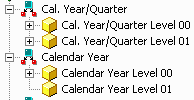
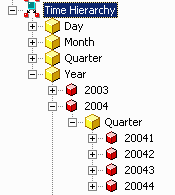
MDX Cubes may also include structured hierarchies that arrange multiple levels of data in an intuitive way.
When reporting against flat hierarchies, particularly if they define data one would expect to be related, surprising results may be obtained.
With Year and Quarter on the template together with no metrics, note that quarters from 2000 appear alongside year 2001 and vice versa.
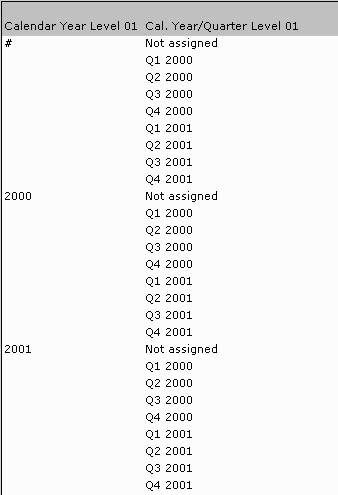
Because they are separate dimensions, there is no inherent relationship between the attribute elements. There is no choice in MDX but to cross join the dimensions, resulting in an arbitrary data relationship.
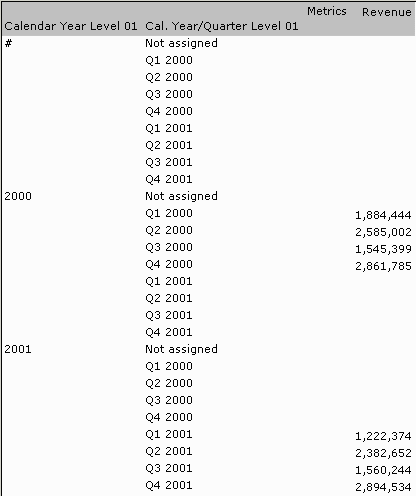
Reporting with a metric produces more conventional results, but this is an illusion produced by the fact that, for example, the metric cell at the location (2000, Q1 2001) is likely to be empty. By default, Strategy-generated MDX queries exclude rows where all metric values are empty. If the VLDB property 'MDX Add Non Empty' is changed to permit empty rows, it becomes clear that the underlying results are no more sensible.
Attribute element browsing is also affected. Browsing through time levels in the Data Explorer, or in hierarchy prompts, becomes impossible because the attributes are not connected.
In relational projects, hierarchical element browsing is performed by issuing SQL queries to retrieve elements from lookup tables according to filters defined by the node of the hierarchy currently being browsed. If the same thing is attempted in a cube that defines related attributes as separate dimensions, as above, again, the hierarchy browsing will be confusing to end-users.
This report displays elements of Cal. Year/Quarter, filtered by Calendar Year = 2000.
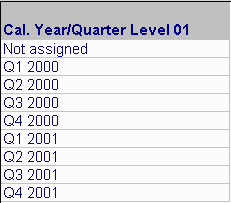
By contrast, when Year and Quarter are arranged hierarchically known as in the multiple-level hierarchy shown above, a report with a corresponding definition behaves as expected.
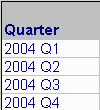
The MDX for the latter report explains why it works as expected to query a hierarchy defined in the cube. Set identifies the descendents of Year 2004 at the Quarter level (thus excluding quarters from any other year), and then these descendents are displayed in the report.
with set as '{.}'
set as '{Generate(, Descendants(.CurrentMember, ., SELF_AND_BEFORE))}'
set as '{..members}'
set as 'Intersect({}, {})'
select on rows
from
The Strategy MDX Engine may also use the Ancestor function to obtain attribute elements for a parent of attribute used in the report filter.
Both functions, Ancestor and Descendants, depend on the attribute data relationships that are defined as part of the cube. MDX does not have the capability to manufacture these data relationships on-the-fly within a particular query. It has powerful features to navigate the pre-defined data relationships -- more powerful than SQL, in some ways -- but the data relationships must be part of the cube structure for this to work.
Because of this fact of the way MDX works, it is not yet clear whether it is possible to define attribute hierarchies in Strategy in a way that would be meaningful for reporting and prompting. As a result, it is strongly recommended to use multiple-level hierarchies defined in the cube to obtain the most intuitive reporting behavior.
