EducationSoftwareStrategy.com
StrategyCommunity

Knowledge Base

Product

Community

Knowledge Base

TopicsBrowse ArticlesDeveloper Zone

Product

Download SoftwareProduct DocumentationSecurity Hub

Education

Tutorial VideosSolution GalleryEducation courses

Community

GuidelinesGrandmastersEvents
x_social-icon_white.svglinkedin_social-icon_white.svg
Strategy logoCommunity

© Strategy Inc. All Rights Reserved.

LegalTerms of UsePrivacy Policy
  1. Home
  2. Topics

KB18403: Variables providing default values in a SAP query cube are not imported in MicroStrategy Developer 10.x


Stefan Zepeda

Salesforce Solutions Architect • Strategy


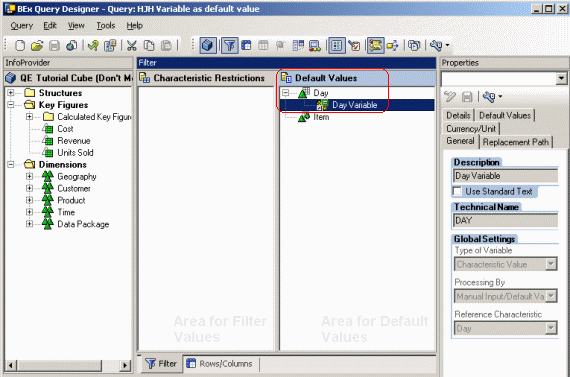
A user wishes to import a query cube from SAP into MicroStrategy Developer 10.x. This query cube uses a variable to specify default values for a characteristic, as shown below:
SYMPTOM:
A user wishes to import a query cube from SAP into Strategy Developer 10.x. This query cube uses a variable to specify default values for a characteristic, as shown below:
 

ka02R000000kcIlQAI_0EM440000002Etk.gif

 
After importing the cube, however, the Cube Mapping tab in the OLAP Cube Catalog shows that the variable was not imported, as shown below:
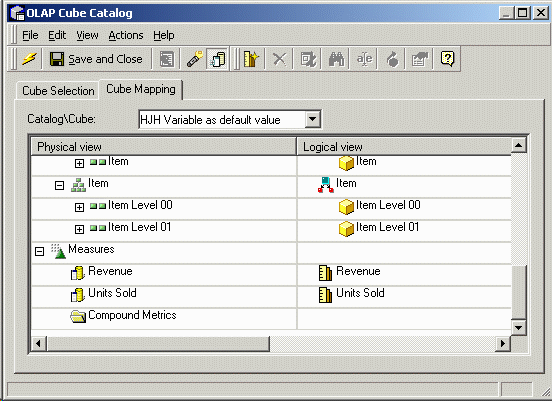
 

ka02R000000kcIlQAI_0EM440000002Etd.gif

 
CAUSE:
Strategy is able to import variables that are used as "Characteristic Restrictions.' These correspond to Strategy prompts used in filters.
 
It is currently under investigation whether it is possible to import variables from 'Default Values' from SAP. Strategy communicates with SAP using the ODBO (OLE DB for OLAP) layer, and in some cases, the information about a cube's structure received from SAP is a subset of the entire structure.
 
ACTION:
If the variables are moved to the 'Characteristic Restrictions' section in Business Explorer Query Designer, Strategy will be able to import them as prompts, as shown below:
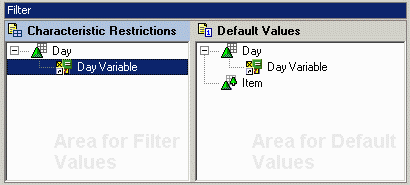
 

ka02R000000kcIlQAI_0EM440000002Eti.gif


Comment

0 comments

Details

Knowledge Article

Published:

May 12, 2017

Last Updated:

May 12, 2017