EducationSoftwareStrategy.com
StrategyCommunity

Knowledge Base

Product

Community

Knowledge Base

TopicsBrowse ArticlesDeveloper Zone

Product

Download SoftwareProduct DocumentationSecurity Hub

Education

Tutorial VideosSolution GalleryEducation courses

Community

GuidelinesGrandmastersEvents
x_social-icon_white.svglinkedin_social-icon_white.svg
Strategy logoCommunity

© Strategy Inc. All Rights Reserved.

LegalTerms of UsePrivacy Policy
  1. Home
  2. Topics

KB18416: When exporting a graph with graph style 'Combination: Dual Axis Bar Line' from MicroStrategy Web 9.x to Excel with the option 'Export graphs as live Excel charts', the graph style is not retained in the exported Excel file


Community Admin

• Strategy


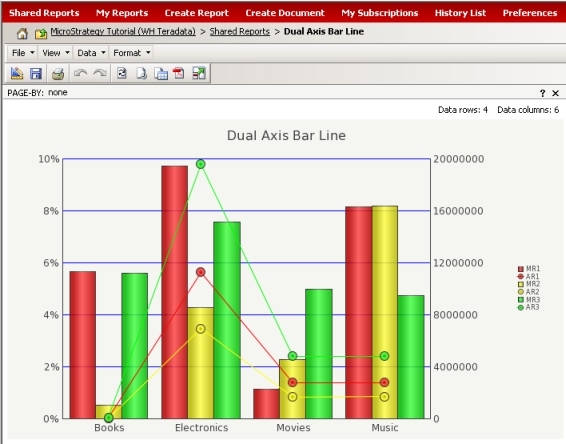
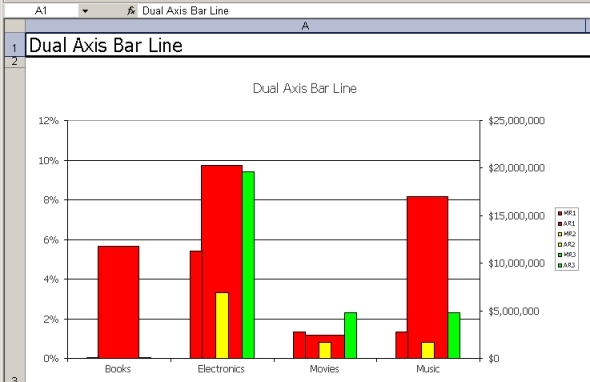
When exporting a graph with graph style 'Combination: Dual Axis Bar Line' from MicroStrategy Web 9.x to Excel with the option 'Export graphs as live Excel charts,' the graph style is not retained in the Excel file after exporting.

SYMPTOM:
When exporting a graph with graph style 'Combination: Dual Axis Bar Line' from Strategy Web 9.x to Excel with the option 'Export graphs as live Excel charts,' the graph style is not retained in the Excel file after exporting. The following image shows the report as it is displayed in Strategy Web 9.x:
 

ka04W000000ObygQAC_0EM4400000028bb.jpeg

 
The following image shows the report after the export to Excel with the option 'Export graphs as live Excel charts':
 

ka04W000000ObygQAC_0EM4400000028bc.jpeg

 
CAUSE:
This is a known limitation of the Excel Export Engine in Strategy 9.x. 
 
ACTION:
An Enhancement Request has been logged to request the Excel Export Engine to support dual-type charts.  Contact Strategy Technical Support to request a status update of this request.
 
WORKAROUND:
Consider exporting the report without the option 'Export graphs as live Excel charts'.


Comment

0 comments

Details

Knowledge Article

Published:

May 31, 2017

Last Updated:

May 31, 2017