EducationSoftwareStrategy.com
StrategyCommunity

Knowledge Base

Product

Community

Knowledge Base

TopicsBrowse ArticlesDeveloper Zone

Product

Download SoftwareProduct DocumentationSecurity Hub

Education

Tutorial VideosSolution GalleryEducation courses

Community

GuidelinesGrandmastersEvents
x_social-icon_white.svglinkedin_social-icon_white.svg
Strategy logoCommunity

© Strategy Inc. All Rights Reserved.

LegalTerms of UsePrivacy Policy
  1. Home
  2. Topics

KB18417: Ability to enable-disable the Project Configuration setting 'Sort drilling options in ascending alphabetical order' with MicroStrategy Command Manager 9.4.x - 10.x


Community Admin

• Strategy


This Knowledge Base article describes how to enable-disable the Project Configuration setting 'Sort drilling options in ascending alphabetical order' with MicroStrategy Command Manager 9.4.x - 10.x

SYMPTOM
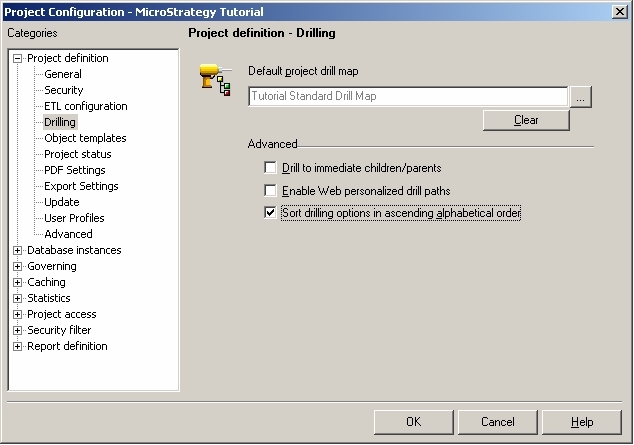
In Strategy Developer 9.4.x - 10.x, it is possible to sort the drilling options in alphabetical order. This setting can be enabled via a checkbox at the Project Configuration level, under 'Drilling' as shown below:
ka04W000000OfbCQAS_0EM440000002BKV.jpeg

 
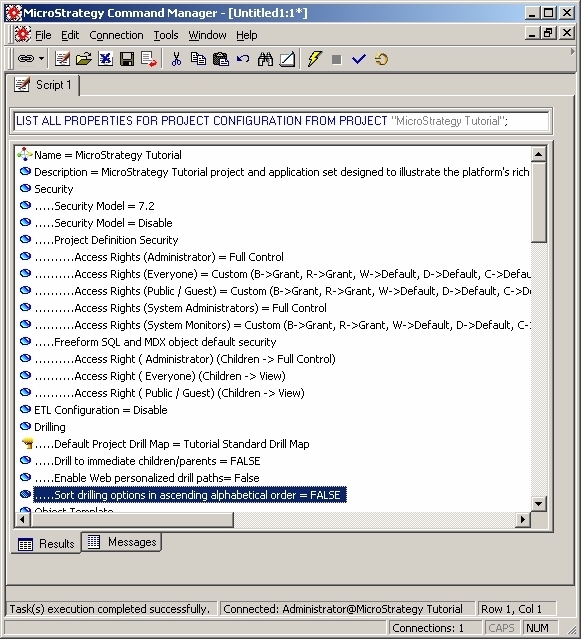
The value of this parameter can be viewed in Strategy Command Manager, using the following command:
ka04W000000OfbCQAS_0EM440000002BKa.jpeg


LIST ALL PROPERTIES FOR PROJECT CONFIGURATION FROM PROJECT "<Project Name>";

ACTION
This project setting can be altered by executing the following Strategy Command Manager 9.4.x -10.x outline: 

ALTER PROJECT CONFIGURATION SORTDRILLPATHS TRUE IN PROJECT "<Project Name>";


KB18417


Comment

0 comments

Details

Knowledge Article

Published:

June 14, 2017

Last Updated:

August 17, 2018