EducationSoftwareStrategy.com
StrategyCommunity

Knowledge Base

Product

Community

Knowledge Base

TopicsBrowse ArticlesDeveloper Zone

Product

Download SoftwareProduct DocumentationSecurity Hub

Education

Tutorial VideosSolution GalleryEducation courses

Community

GuidelinesGrandmastersEvents
x_social-icon_white.svglinkedin_social-icon_white.svg
Strategy logoCommunity

© Strategy Inc. All Rights Reserved.

LegalTerms of UsePrivacy Policy
  1. Home
  2. Topics

KB18462: How to define a user who can create and modify attributes and fact but who is not allowed to load the Warehouse Catalog in MicroStrategy Developer


Stefan Zepeda

Salesforce Solutions Architect • Strategy


Access to the Warehouse Catalog in MicroStrategy Developer can be granted to developers with Architect privileges.

In Strategy Developer, if multiple developers work simultaneously on the same project, it is important to restrict the access to certain features such as the Warehouse Catalog, and only grant access to a few selected developers.
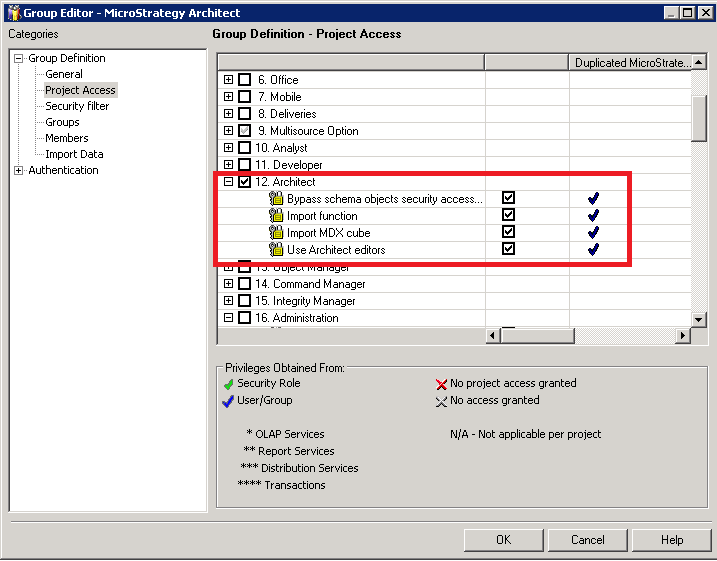
For users to be able to create and modify attributes and facts, they need to have Architect privileges granted as shown below:
ka02R000000kbZEQAY_0EM440000002QLa.png

 
Schema objects include attributes, facts, hierarchies, transformations, tables, partition mappings, etc. and can be found under the 'Schema Objects' folder.
If no Administration privileges are granted, users will not be able to access the Warehouse Catalog.


Comment

0 comments

Details

Knowledge Article

Published:

June 14, 2017

Last Updated:

June 14, 2017