EducationSoftwareStrategy.com
StrategyCommunity

Knowledge Base

Product

Community

Knowledge Base

TopicsBrowse ArticlesDeveloper Zone

Product

Download SoftwareProduct DocumentationSecurity Hub

Education

Tutorial VideosSolution GalleryEducation courses

Community

GuidelinesGrandmastersEvents
x_social-icon_white.svglinkedin_social-icon_white.svg
Strategy logoCommunity

© Strategy Inc. All Rights Reserved.

LegalTerms of UsePrivacy Policy
  1. Home
  2. Topics

KB18469: How to obtain a specific attribute element from a large element list containing similar words within a string within a prompt in MicroStrategy Developer 10.x


Stefan Zepeda

Salesforce Solutions Architect • Strategy


If an attribute has a large element set, it is likely that a user will have to do a search within the element list within the prompt. User must enter search term in double quotes for an exact match.

If an attribute has a large element set, it is likely that a user will have to do a search within the element list within the prompt.
 
For example, there may be several cities with the words SAN or FRANCISCO in them, City being an element of the attribute Region, in Strategy Tutorial project.
 
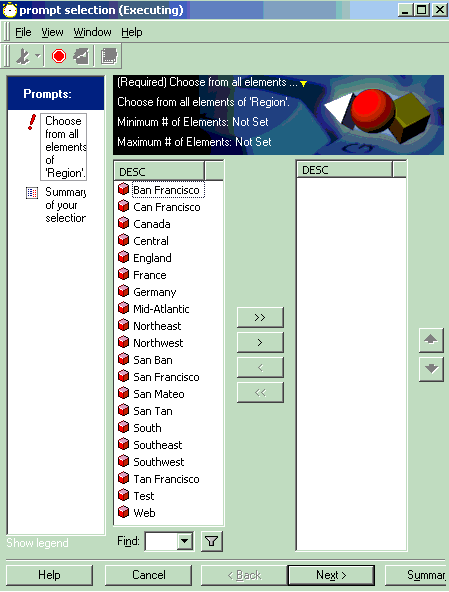
If an attribute element prompt on Region is created and added to a report, when the report is executed, the prompt lists all elements of Region attribute as shown below:
 

ka02R000000kVoyQAE_0EM440000002Erl.gif

 
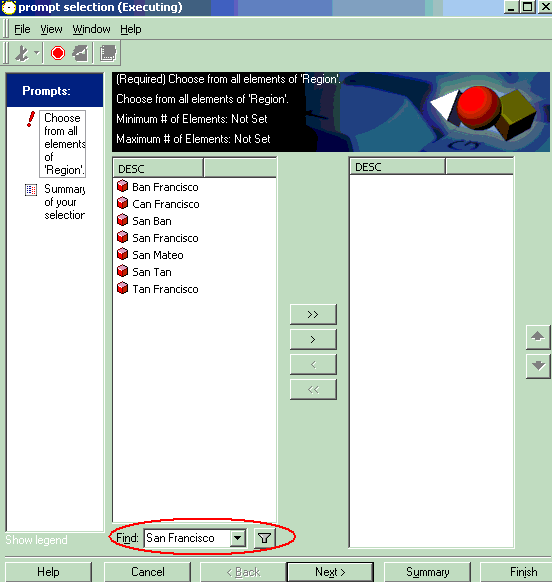
If the user wants to find San Francisco from within this list and types in San Francisco in the Search section at the bottom of the prompt, the data returned is, as shown below:
 

ka02R000000kVoyQAE_0EM440000002Erj.gif

 
All the attribute elements with the words 'San' or 'Francisco' anywhere in the string are returned and in a large list of elements containing either one of these words, the user still searches further by scrolling or moving to the next lot of elements, if present.
 
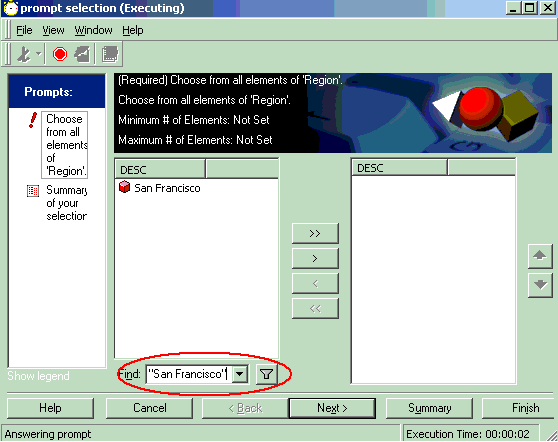
In order to bring up the specific element, the user needs to enter San Francisco as the search criteria within double quotes, as shown below:
 

ka02R000000kVoyQAE_0EM440000002Erm.gif

 
The specific element being searched for is returned.


Comment

0 comments

Details

Knowledge Article

Published:

May 23, 2017

Last Updated:

May 23, 2017