EducationSoftwareStrategy.com
StrategyCommunity

Knowledge Base

Product

Community

Knowledge Base

TopicsBrowse ArticlesDeveloper Zone

Product

Download SoftwareProduct DocumentationSecurity Hub

Education

Tutorial VideosSolution GalleryEducation courses

Community

GuidelinesGrandmastersEvents
x_social-icon_white.svglinkedin_social-icon_white.svg
Strategy logoCommunity

© Strategy Inc. All Rights Reserved.

LegalTerms of UsePrivacy Policy
  1. Home
  2. Topics

KB18470: How to define a Project Status Message to be displayed in MicroStrategy Web 9.x and 10.x using MicroStrategy Developer


Stefan Zepeda

Salesforce Solutions Architect • Strategy


This article explains how to define a Project Status Message to be displayed in MicroStrategy Web 9.x and 10.x using MicroStrategy Developer

Strategy Web 9.4.1 and newer can display a 'Project Status' message as defined in Strategy Developer. This message can be any piece of Hyper Text Markup Language (HTML) defined by the Administrator of each project and will be displayed at either the top or the bottom of the Project Home page in Strategy Web.
 
To define the contents of the Project Status Page, follow the steps below:
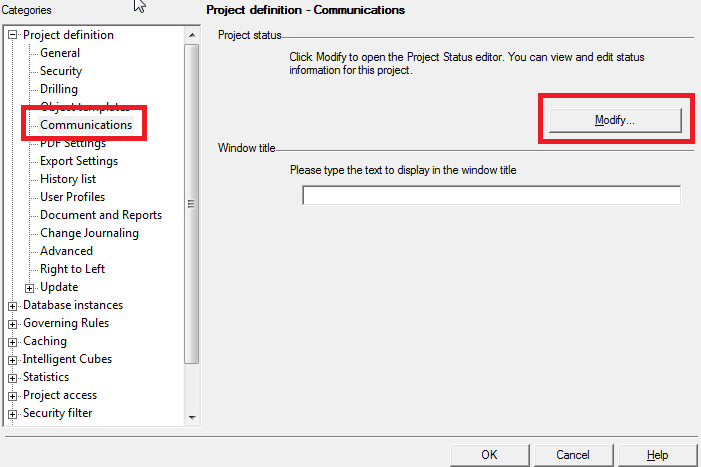
 

  • Open Strategy Developer 9.x and 10.x. Right-click on the project for which to define a Status Message. Select 'Project Configuration.'
  • Expand 'Project Definition' in the Project Configuration Editor.
  • Highlight 'Communications.' Click on the 'Modify' button at the right of the form, as shown below:
ka044000000kI7AAAU_0EM440000002Ero.png
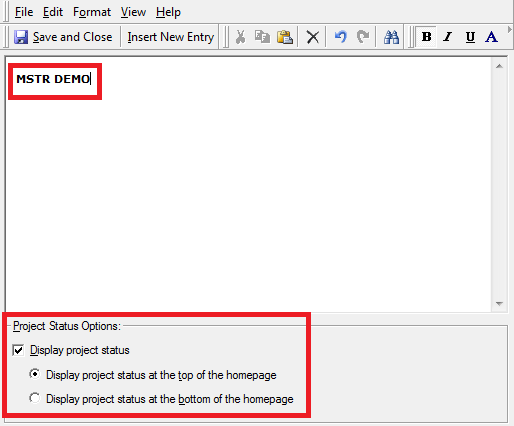
  • Type and format the text to be displayed.
  • Select the 'Display Project Status' checkbox to enable this text to be displayed in the Project's Home Page through Strategy Web, as shown below:
ka044000000kI7AAAU_0EM440000002Erk.png
  • Choose whether the text will be displayed at the top or bottom of the homepage by selecting one of the radio buttons in the lower section of the form.
  • Click on 'Save and Close.'
  • Click on 'OK' in the Project Configuration form.
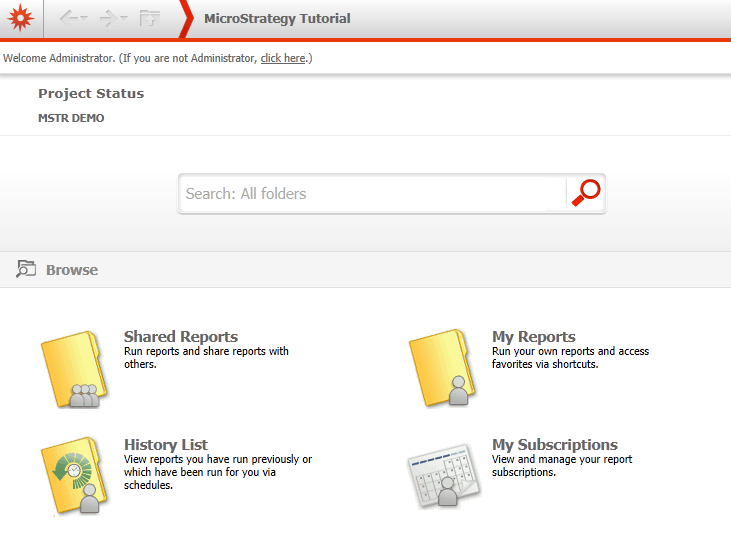
  • Log onto the project through Strategy Web 9.x and 10.x, as shown below:
ka044000000kI7AAAU_0EM440000002Erp.png


KB418014


Comment

0 comments

Details

Knowledge Article

Published:

June 14, 2017

Last Updated:

May 8, 2018