SYMPTOM:
The user notices that upon start or restart of Strategy Intelligence Server Universal, the following error is seen:
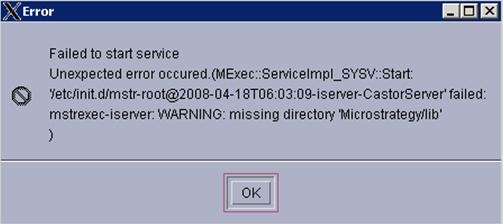
'Failed to start service. Unexpected error occurred. (MExec::ServiceImpl_SYSV::Start: '/etc/init.d/mstr-root@2008-04-18T06:03:09-iserver-CastorServer' failed: mstrexec-iserver: WARNING: missing directory 'XXX')'.
The user also notices that the Strategy Configuration Wizard log (MACfgWiz.log) has the following entries when this error is encountered:
'4/18/08 9:10 AM The current Server definition has been changed. You must restart the service for the changes to take effect. Do you wish to do so now?
4/18/08 9:10 AM One or more errors occurred while performing configuration.
Unexpected error occured. (MExec::ServiceImpl_SYSV::Start: '/etc/init.d/mstr-root@2008-04-18T06:03:09-iserver-CastorServer' failed:
mstrexec-iserver: WARNING: missing directory 'Strategy/lib')'
Note: If the user clicks on 'Ok' for this error message dialog box, Strategy Intelligence Server Universal will start successfully.
CAUSE:
The cause of this issue is the missing forward slash (/) at the beginning of the string value for a library path in one of the environment scripts used to setup the environment before starting the Strategy Intelligence Server Universal.
ACTION:
The user must review the contents of any shell scripts that have been modified post installation that are used by Strategy Intelligence Server Universal. Typical scripts that are modified by users would be the LDAP.sh and the ODBC.sh shell scripts. Users should ensure that the paths for any libraries specified contain valid and complete path references. The shell scripts used by Strategy Intelligence Server Universal can be found in the /env directory.
