In URL API, there are available several parameters to answers prompts:
Among all of these, only 'promptsAnswerXML' can be use to answers nested prompts.
The parameter 'promptsAnswerXML' passes some Strategy XML to the web server that contains all the information necessary to answer prompts. This is an example of how to use this parameter with URL API to run a report.
http://WEBSERVER/MicroStrategy/asp/Main.aspx?evt=4001&src=Main.aspx.4001&reportViewMode=1&reportID=1FBA02664A43404AFEADBA8E84A2C742&project=Strategy+Tutorial&server=INTELLIGENCESERVER&uid=administrator&pwd=&promptsAnswerXML=PROMPTSANSWERSXML
There is little documentation on how to construct the XML for this parameter. The user can use the following procedure to obtain the necessary XML to complete the URL API call:
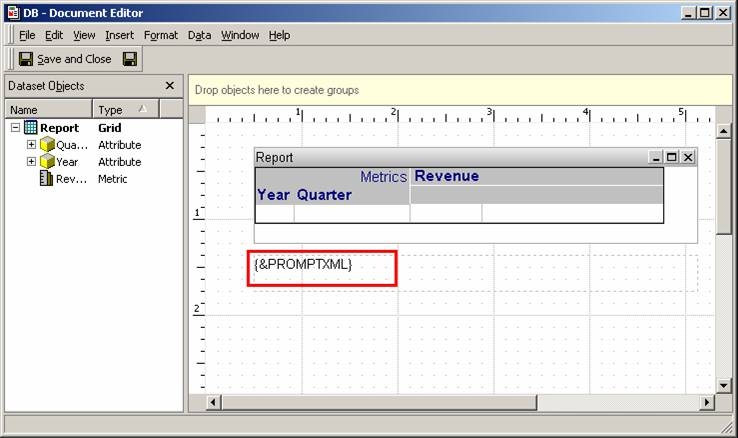
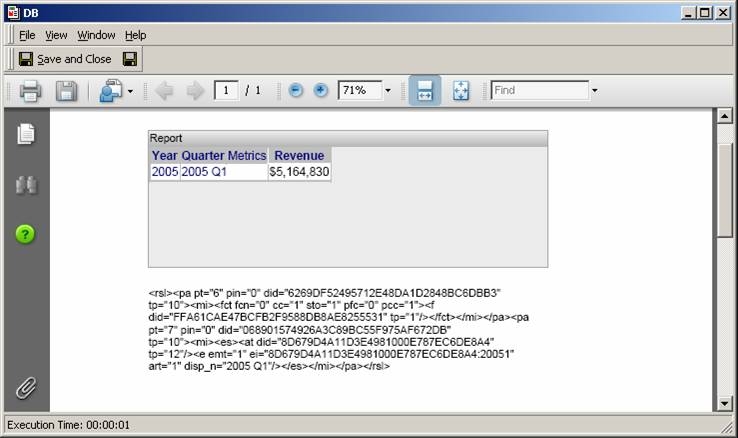
http://WEBSERVER/MicroStrategy/asp/Main.aspx?evt=4001&src=Main.aspx.4001&reportViewMode=1&reportID=1FBA02664A43404AFEADBA8E84A2C742&project=Strategy+Tutorial&server=INTELLIGENCESERVER&uid=administrator&pwd=&promptsAnswerXML=<rsl><pa pt="6" pin="0" did="6269DF52495712E48DA1D2848BC6DBB3" tp="10"><mi><fct fcn="0" cc="1" sto="1" pfc="0" pcc="1"><f did="FFA61CAE47BCFB2F9588DB8AE8255531" tp="1"/></fct></mi></pa><pa pt="7" pin="0" did="068901574926A3C89BC55F975AF672DB" tp="10"><mi><es><at did="8D679D4A11D3E4981000E787EC6DE8A4" tp="12"/><e emt="1" ei="8D679D4A11D3E4981000E787EC6DE8A4:20051" art="1" disp_n="2005 Q1"/></es></mi></pa></rsl>
Additionally, users can capture the XML with Strategy Java SDK 9.x. The following Strategy Knowledge Base technical note describes how to accomplish this:
KB18358 (KB6100-811-2456): How to Capture the Prompt Answers Supplied by the User at Runtime Using the Strategy Java Web SDK 9.0.x
Code Customization:
WARNING:
This customization is provided as a convenience to Strategy users and is only directly applicable to the version stated. While this code may apply to other releases directly, Strategy Technical Support makes no guarantees that the code provided will apply to any future or previous builds. In the event of a code change in future builds, Strategy Technical Support makes no guarantee that an updated version of this particular customization will be provided. In the event of a code change in future builds, Strategy may not be able to provide additional code on this matter even though this customization is provided at this time for this specific build. For enhancements to this customization or to incorporate similar functionality into other versions, contact your Account Executive to inquire about Strategy Consulting assistance.
18540
