EducationSoftwareStrategy.com
StrategyCommunity

Knowledge Base

Product

Community

Knowledge Base

TopicsBrowse ArticlesDeveloper Zone

Product

Download SoftwareProduct DocumentationSecurity Hub

Education

Tutorial VideosSolution GalleryEducation courses

Community

GuidelinesGrandmastersEvents
x_social-icon_white.svglinkedin_social-icon_white.svg
Strategy logoCommunity

© Strategy Inc. All Rights Reserved.

LegalTerms of UsePrivacy Policy
  1. Home
  2. Topics

KB18560: How to create a dynamic subscription set where only the personalization preference property is retrieved from the subscriptions table in MicroStrategy Narrowcast Server 9.x - 10.x


Community Admin

• Strategy


There may come a point where it is desirable to utilize a dynamic subscription set to provide a means of chosing which users will receive a particular service at run-time. In such a situation it is likely that the MicroStrategy Narrowcast Server 9.x - 10.x administrator will not want to duplicate all of the user information that is stored in the Subscription Book Repository into the data warehouse. This technical note will walk through the basic steps that are necessary to leverage the existing user information stored in the Subscription Book Repository while utilizing a dynamic subscription set for run-time decisions for service execution.

It is common for the majority, if not all, of the user information to be stored in the Subscription Book Repository. This information includes, but is not limited to:

  • Name (First Name, Middle Initial, Last Name, Suffix, Title, Salutation)
  • User ID
  • Login ID
  • Address ID
  • Physical Address
  • Device (ID and Name)
  • Locale (ID and Name)
  • Street Address
  • City
  • State
  • Zip Code
  • Country

There may come a point where it is desirable to utilize a dynamic subscription set to provide a means of chosing which users will receive a particular service at run-time. In such a situation it is likely that the Strategy Narrowcast Server 9.x - 10.x administrator will not want to duplicate all of the user information that is stored in the Subscription Book Repository into the data warehouse.
 
This technical note will walk through the basic steps that are necessary to leverage the existing user information stored in the Subscription Book Repository while utilizing a dynamic subscription set for run-time decisions for service execution.
 
For preliminary information regarding the requirements for dynamic subscription services, refer to the following Strategy Knowledge Base articles:

  • KB10492 - What are the requirements and considerations for dynamic subscription services?
  • KB10469 - What are the data types and formats of subscription information for dynamic subscription sets?
  • KB11346 - What is the difference between segmentation attributes and slicing attributes in Strategy Narrowcast Server dynamic subscription services?

For information about setting up dynamic subscription services for use with Personalized Report Execution documents, refer to the following Strategy Knowledge Base articles:

  • KB12127 - How to create a dynamic report execution service in Strategy Narrowcast Server 9.x
  • KB14702 - How to create the xml containing the preference object for personalized report execution in Strategy Narrowcast Server 9.x

 
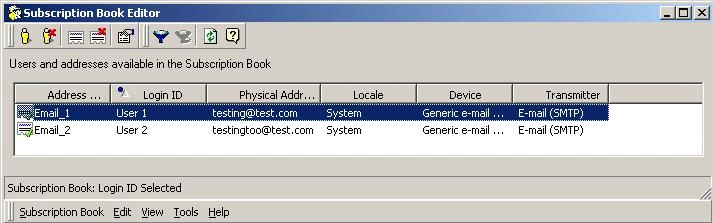
For simplicity, this technical note will only consider a scenario where an email delivery needs to be made to the two users, it will be trivial to scale the number of users to adjust for file delivery. The following image shows the two users as seen in the Subscription Book Editor:
ka04W000000OhluQAC_0EM440000002BJd.jpeg

 
A. Obtain the Subscription IDs for the users from the Subscription Book Repository:

  • Using Strategy DB Query Tool, or another equivalent 3rd party query tool, run the following query against the Subscription Book Repository (SBR), replace '<prefix>' with the Narrowcast system prefix:
    
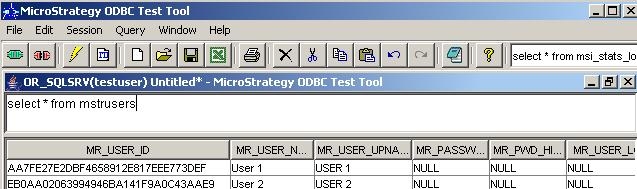
    SELECT * FROM <prefix>MSTRUSERS

  • The query will return all of the users in the SBR. In this example, the two users are retrieved as shown below:
ka04W000000OhluQAC_0EM440000002BJS.jpeg
  • From the obtained results set, make note of the User IDs (MR_USER_ID) corresponding to the desired users.
  • For each User ID from Step 2:
    • Run the following query to get the Address IDs corresponding to the user's addresses in the SBR:
      
      SELECT MR_ADDRESS_ID, MR_PHYSICAL_ADD FROM <prefix>MSTRADDRESSES WHERE MR_USER_ID ='MR_USER_ID for a user obtained from Step 2'
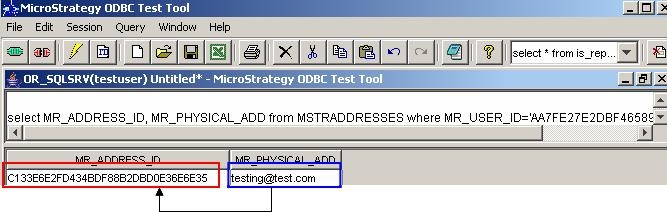
    • Obtain the value of each MR_ADDRESS_ID corresponding to a desired physical address for the user.
ka04W000000OhluQAC_0EM440000002BJi.jpeg
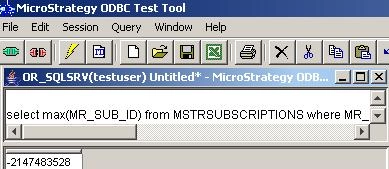
    • For each Address ID obtained in B, run the following query to get the correct Subscription ID for this user-address combination from the SBR:
      
      SELECT MAX(MR_SUB_ID) FROM <prefix>MSTRSUBSCRIPTIONS WHERE MR_USER_ID=`User ID from 3A` AND MR_ADDRESS_ID ='Address ID from 3B'
ka04W000000OhluQAC_0EM440000002BJf.jpeg
    • Repeat steps 3A - 3C to get the Subscription IDs for the other users.

B. Create the subscriptions table:
Since all of the information, except for the personalization preference, is obtained from the Subscription Book Repository, the subscriptions table will only need two columns - one for the Subscription ID and one for the personalization preference. Depending on the complexity of the dynamic subscription set and the intended scale it is possible that this table will have more columns, however it must have at least these two.
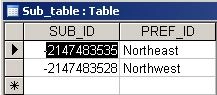
  • Create the subscriptions table; as per the following Strategy Knowledge Base technical note, the Subscription ID column must have a datatype equivalent to a 4-byte integer:
  • KB10469 - What are the data types and formats of subscription information for dynamic subscription sets?
  • Insert the Subscription IDs obtained from section 'A. Obtain the Subscription IDs for the users from the Subscription Book Repository' steps 3C and 3D into the subscriptions table.

    Note: The values for personalization preference should be inserted based on if the service is delivering a prompted report or a report with a page-by. For more information, refer to the following Strategy Knowledge Base technical note:

    KB14702 - How to create the xml containing the preference object for personalized report execution in Strategy Narrowcast Server 9.x

    The final subscriptions table will look something like the following (the example of User 1 and User 2):

ka04W000000OhluQAC_0EM440000002BJb.jpeg

 
C. Create the attributes for the dynamic subscription set in Strategy Developer:
The attributes for the Subscription ID and personalization preference should be created in the metadata. This should be accomplished by using Strategy Developer 9.x - 10.x as outlined in the following Strategy Knowledge Base article:
KB12127 - How to create a dynamic report execution service in Strategy Narrowcast Server 9.x
 
D. Configure and create dynamic subscription set objects on Strategy Narrowcast Server 9.x - 10.x Administrator:
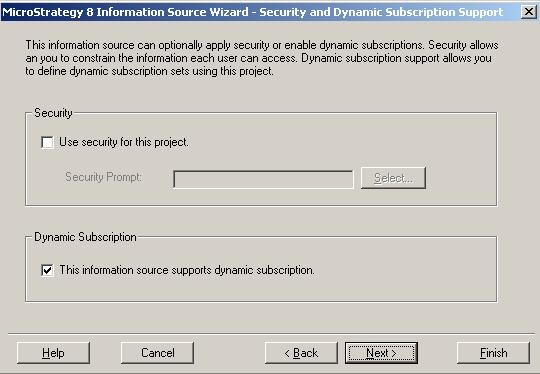
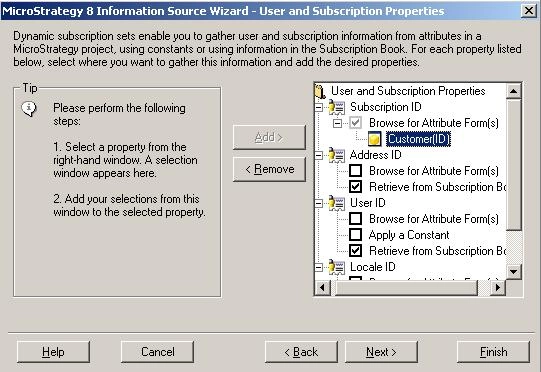
  • In Strategy Narrowcast Server 9.x - 10.x Administrator, edit the required Information Source object to define dynamic subscription properties; this is necessary in order to create a dynamic subscription set, even if a dynamic subscription report will be used (Administration > Information Source Modules > Strategy > 'Required Information Source' > Edit > Define > Next).
  • Navigate to the 'Security and Dynamic Subscription Support' page. Check the box next to 'This information source supports dynamic subscription' before clicking 'Next'.
ka04W000000OhluQAC_0EM440000002BJm.jpeg
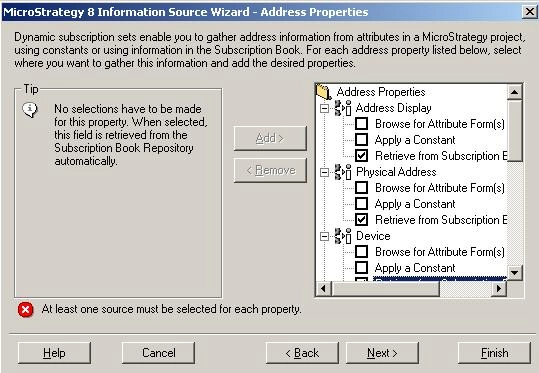
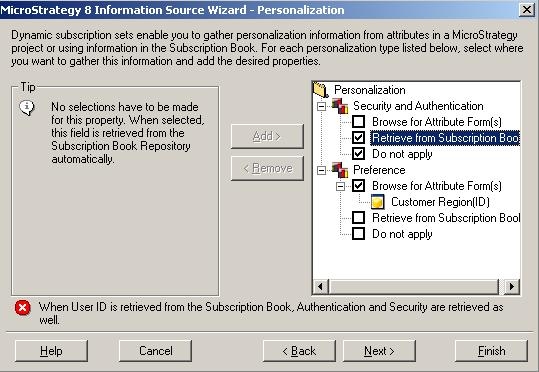
  • Define the dynamic subscription properties such that only the Subscription ID and Preference properties are retrieved from the project, these should be set based on the attributes created in section C above. All other properties should be set to 'Retrieved from Subscription Book'.
ka04W000000OhluQAC_0EM440000002BJW.jpeg
ka04W000000OhluQAC_0EM440000002JWz.jpeg
ka04W000000OhluQAC_0EM440000002BJg.jpeg
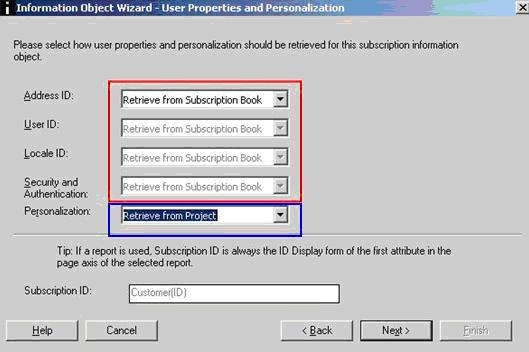
  • When creating the Subscription Information Object, choose either the option to 'Retrieve dynamic subscription information from the information source and do not choose a filter' or the option ''Retrieve dynamic subscription information from the information source and choose a filter'. As seen in the screenshot below, only the subscription ID and Preference will be selected from the project and everything else will automatically be marked to be retrieved from the Subscription Book.

    Note: Depending on the intended dynamic subscription setup, it is possible that the option to 'Select or define a report and return dynamic subscription information from the selected report' can be used, however this will require manually setting the properties to 'Retrieve from Subscription Book'.
ka04W000000OhluQAC_0EM440000002BJY.jpeg
  • Use the created subscription information object as the source for the dynamic subscription set in the desired service to deliver the content to the users defined in the subscriptions table.

Comment

0 comments

Details

Knowledge Article

Published:

April 14, 2017

Last Updated:

April 14, 2017