EducationSoftwareStrategy.com
StrategyCommunity

Knowledge Base

Product

Community

Knowledge Base

TopicsBrowse ArticlesDeveloper Zone

Product

Download SoftwareProduct DocumentationSecurity Hub

Education

Tutorial VideosSolution GalleryEducation courses

Community

GuidelinesGrandmastersEvents
x_social-icon_white.svglinkedin_social-icon_white.svg
Strategy logoCommunity

© Strategy Inc. All Rights Reserved.

LegalTerms of UsePrivacy Policy
  1. Home
  2. Topics

KB18634: 'The token ‘{token_name}’ within the expression has been found in more than one location' error occurs when running a script in MicroStrategy Command Manager 9.4.x-10.x.


Community Admin

• Strategy


This knowledge base article explains why 'The token ‘{token_name}’ within the expression has been found in more than one location' error occurs when running a script in MicroStrategy Command Manager 9.4.x-10.x

SYMPTOM:
 
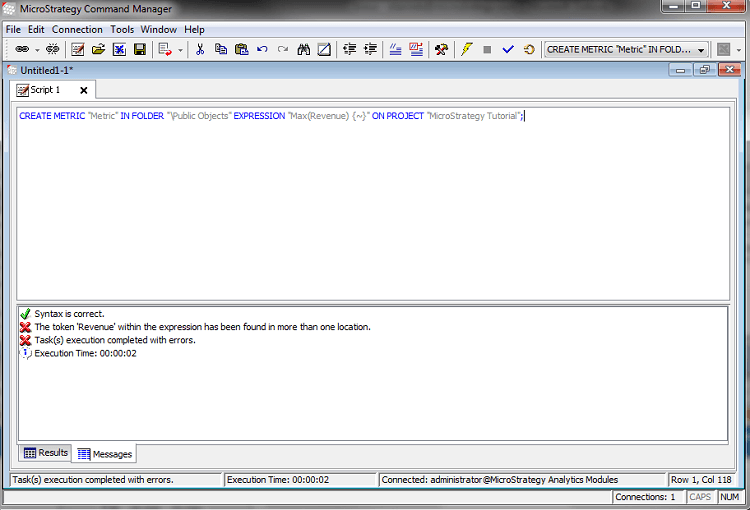
The following error is returned while attempting to create a new metric using Strategy Command Manager 9.4.x-10.x:
ka04W000000OejzQAC_0EM440000002BHA.png


The token '{token_name}' within the expression has been found in more than one location

STEPS TO REPRODUCE:
To reproduce this issue, in Strategy Command Manager 9.4.x-10.x, create a metric using the 'Revenue' metric and execute the script:
 

CREATE METRIC "Metric" IN FOLDER "\Public Objects" EXPRESSION "Max(Revenue) {~}" ON PROJECT "Strategy Tutorial";

CAUSE:
There are multiple objects that share the same name being used to define the metric expression.
 
ACTION:
Specify the location of the object to be used in the metric expression. An example using Strategy Tutorial would be:
 

CREATE METRIC "Metric" IN FOLDER "\Public Objects" EXPRESSION "Max() {~}" ON PROJECT "Strategy Tutorial";


Comment

0 comments

Details

Knowledge Article

Published:

June 7, 2017

Last Updated:

June 7, 2017