EducationSoftwareStrategy.com
StrategyCommunity

Knowledge Base

Product

Community

Knowledge Base

TopicsBrowse ArticlesDeveloper Zone

Product

Download SoftwareProduct DocumentationSecurity Hub

Education

Tutorial VideosSolution GalleryEducation courses

Community

GuidelinesGrandmastersEvents
x_social-icon_white.svglinkedin_social-icon_white.svg
Strategy logoCommunity

© Strategy Inc. All Rights Reserved.

LegalTerms of UsePrivacy Policy
  1. Home
  2. Topics

KB18678: A metric does not display In a report for all users except the Administrator in MicroStrategy Developer 9.x


Stefan Zepeda

Salesforce Solutions Architect • Strategy


A metric that has 'View' permissions for the Everyone group cannot be seen by anyone other than the Administrator in MicroStrategy Developer 9.x. Components of the metric, such as the fact the metric is based off of, also have permissions for the Everyone group.

SYMPTOM:
A metric that has 'View' permissions for the Everyone group cannot be seen by anyone other than the Administrator in Strategy Developer 9.x.
Components of the metric, such as the fact the metric is based off of, also have permissions for the Everyone group.
 
CAUSE:
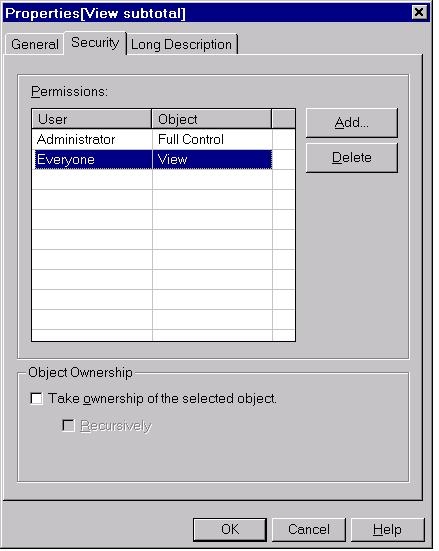
One cause can be that the subtotal of the metric does not have view permissions for the everyone group. This will prevent users from seeing the metric as well.
 
ACTION:
Change the permissions of the subtotal to allow the 'Everyone' group 'view' permission as shown below:
 

ka02R000000kbyYQAQ_0EM440000002EmV.jpeg


Comment

0 comments

Details

Knowledge Article

Published:

June 5, 2017

Last Updated:

June 5, 2017