EducationSoftwareStrategy.com
StrategyCommunity

Knowledge Base

Product

Community

Knowledge Base

TopicsBrowse ArticlesDeveloper Zone

Product

Download SoftwareProduct DocumentationSecurity Hub

Education

Tutorial VideosSolution GalleryEducation courses

Community

GuidelinesGrandmastersEvents
x_social-icon_white.svglinkedin_social-icon_white.svg
Strategy logoCommunity

© Strategy Inc. All Rights Reserved.

LegalTerms of UsePrivacy Policy
  1. Home
  2. Topics

KB18691: How to export a report to Microsoft Excel so that the title of each sheet is the name of each page by element of the report in MicroStrategy Developer 9.x and 10.x


Stefan Zepeda

Salesforce Solutions Architect • Strategy


KB18691: How to export a report to Microsoft Excel so that the title of each sheet is the name of each page by element of the report in MicroStrategy Developer 9.x and 10.x

SYMPTOM:
When exporting a report with attributes in the page by section to Microsoft Excel from Strategy Developer 9.x and 10.x, the worksheets in Microsoft Excel will be named 'Sheet 1,' 'Sheet 2,' etc.
 
STEPS TO REPRODUCE:
Follow the steps below to reproduce this issue in the Strategy Tutorial Project:
 

  • Create a report with attribute Year in the page-by, attribute Quarter in the columns and metric Profit.
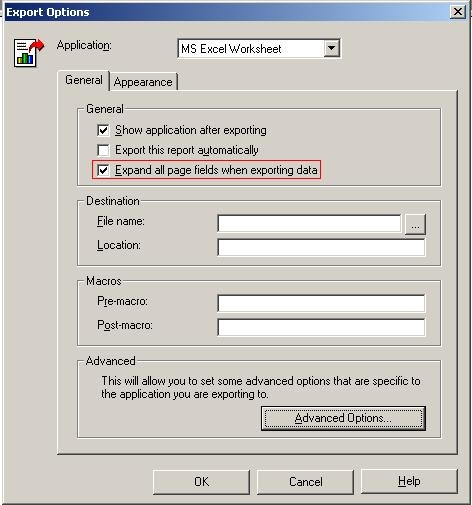
  • Go to Data > Export Options and check the 'Expand all fields when exporting data' checkbox, as shown below:
ka02R000000kbIyQAI_0EM440000002V2c.jpeg
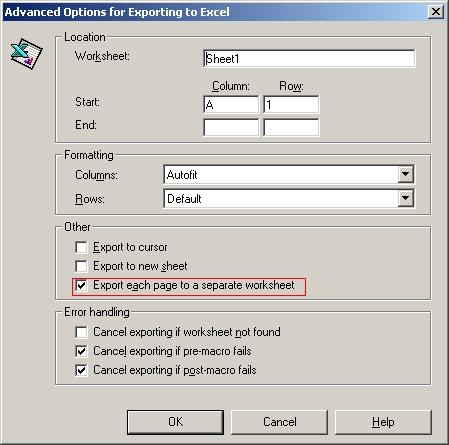
  • Click on the Advanced Option button and check the 'Export each page to a separate worksheet' checkbox as shown in the images below:
ka02R000000kbIyQAI_0EM440000002V2i.jpeg
  • Export the report to Excel, and notice the names of the three worksheets are 'Sheet 1,' 'Sheet 2,' and 'Sheet 3' as shown below:
ka02R000000kbIyQAI_0EM440000002V2X.jpeg

CAUSE:
It is not possible to customize the name each worksheet will get when exporting a report to Microsoft Excel in Strategy Developer 9.x and 10.x.
 
ACTION:
Export the report from Strategy Web 9.x or 10.x. The default behavior if a report is exported from Strategy Web is to name each Excel worksheet with the name of each attribute element in the page by section, as shown below:
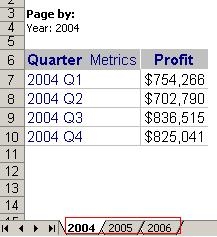
 

ka02R000000kbIyQAI_0EM440000002V2e.jpeg

Before exporting from Strategy Web, the user must select 'Excel XP, Excel 2003 or newer versions' in the Excel Version drop down list under the Export Web Preferences, as shown below:
 

ka02R000000kbIyQAI_0EM440000002V2b.jpeg

This is necessary for the 'Place each page on a separate sheet' option to become available when exporting the report, as shown below:
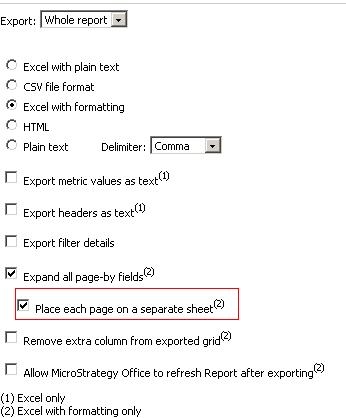
 

ka02R000000kbIyQAI_0EM440000002V2d.jpeg

Comment

0 comments

Details

Knowledge Article

Published:

July 19, 2017

Last Updated:

July 19, 2017