EducationSoftwareStrategy.com
StrategyCommunity

Knowledge Base

Product

Community

Knowledge Base

TopicsBrowse ArticlesDeveloper Zone

Product

Download SoftwareProduct DocumentationSecurity Hub

Education

Tutorial VideosSolution GalleryEducation courses

Community

GuidelinesGrandmastersEvents
x_social-icon_white.svglinkedin_social-icon_white.svg
Strategy logoCommunity

© Strategy Inc. All Rights Reserved.

LegalTerms of UsePrivacy Policy
  1. Home
  2. Topics

KB18694: How to align negative and positive values when using parenthesis in MicroStrategy Developer and Web


Stefan Zepeda

Salesforce Solutions Architect • Strategy


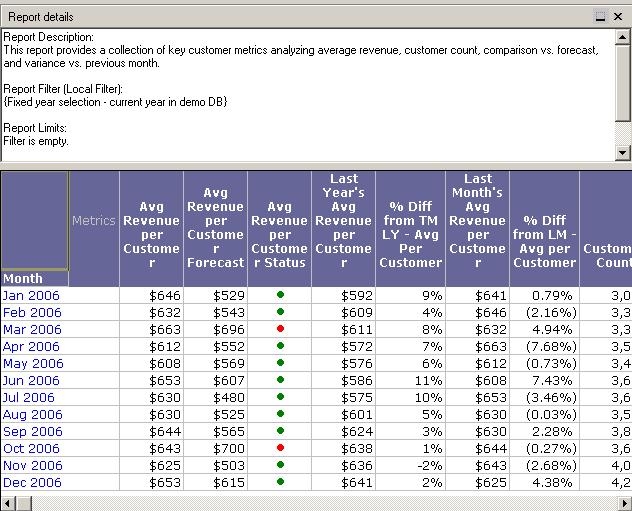
Users may want to align negative values when they are displayed using parentheses so that a blank space appears at the end on positive numbers.

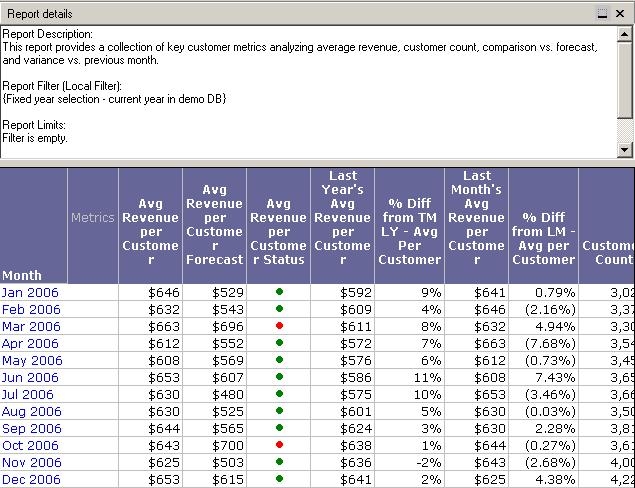
Users may want to align negative values when they are displayed using parentheses so that a blank space appears at the end on positive numbers, as shown below:
 
Default behavior:
 

ka02R000000kYi9QAE_0EM440000002Ems.jpeg

Desired behavior:
 

ka02R000000kYi9QAE_0EM440000002Emq.jpeg

Follow the steps below to align positive and negative numbers while using parentheses around negative values:
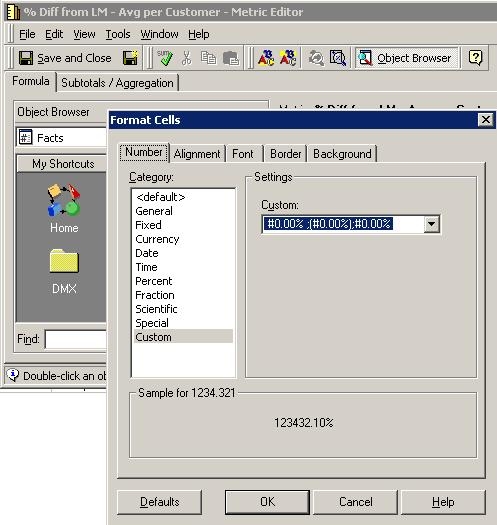
 

  • Open the metric that needs to be formatted in the Metric Editor.
  • Change the format for this metric's values. In the Metric Editor, go to the Tools menu and select Formatting > Values.
  • In the Format Cells window, select Custom and type the format "#0.00% ;(#0.00%);#0.00% " as shown in the image below (note that there is a blank space between the '%' and the ';').
ka02R000000kYi9QAE_0EM440000002Emw.jpeg
  • Save and close the metric.
  • Run the report that has the metric. All the numbers and the '%' symbol will be aligned as shown in the image below:
ka02R000000kYi9QAE_0EM440000002Emq.jpeg

Comment

0 comments

Details

Knowledge Article

Published:

June 5, 2017

Last Updated:

June 5, 2017