EducationSoftwareStrategy.com
StrategyCommunity

Knowledge Base

Product

Community

Knowledge Base

TopicsBrowse ArticlesDeveloper Zone

Product

Download SoftwareProduct DocumentationSecurity Hub

Education

Tutorial VideosSolution GalleryEducation courses

Community

GuidelinesGrandmastersEvents
x_social-icon_white.svglinkedin_social-icon_white.svg
Strategy logoCommunity

© Strategy Inc. All Rights Reserved.

LegalTerms of UsePrivacy Policy
  1. Home
  2. Topics

KB18704: Tables are not visible in the Warehouse Catalog when using HP Neoview 2.0 Database


Stefan Zepeda

Salesforce Solutions Architect • Strategy


Tables are not visible in the Warehouse Catalog when using HP Neoview 2.0 Database

SYMPTOM:
When using HP Neoview 2.0 as the warehouse database, the user is not able to see all the database tables via the Warehouse Catalog. The user can see them using ODBC Test Tool and Native Querying Tools, but they are missing in the catalog.
 
CAUSE:
The SQL used by default by the HP Neoview 2.0 driver does not bring all the existing tables in the database.
 
WORKAROUND:
The workaround consists in using ODBC commands to bring the tables to the Warehouse Catalog instead of using SQL statements. To accomplish this, users must make a temporary change in the configuration of the database instance to use a different SQL statement to read the tables from the database. Users must do the following:
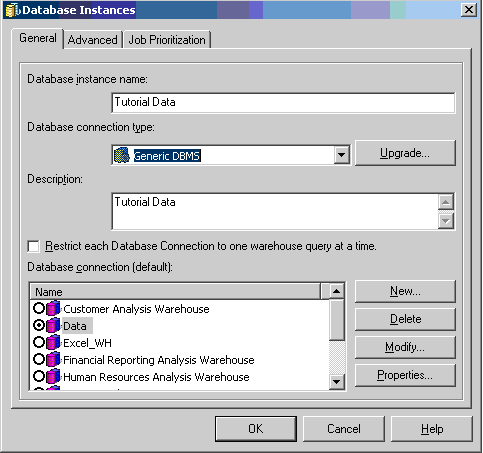
 

  • Go to the warehouse Database Instance in Strategy Developer and select 'Generic DBMS' in the 'Database connection type' field, as shown below:
ka02R000000kWyCQAU_0EM440000002Eqq.jpeg
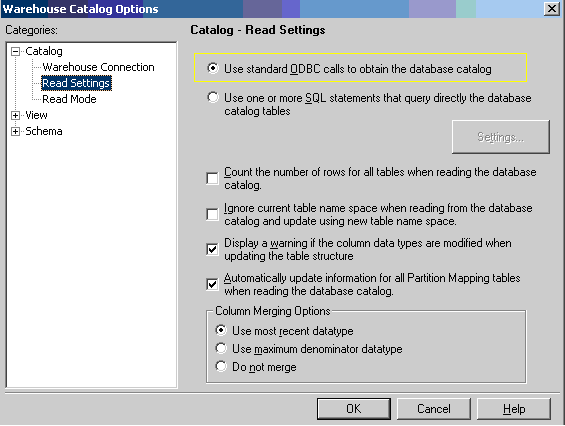
  • Open the Warehouse Catalog and go to 'Warehouse Catalog Options'. Change the 'Read Settings' by selecting 'Use standard ODBC calls to obtain the database catalog', and select OK, as shown below:
ka02R000000kWyCQAU_0EM440000002Eqn.jpeg
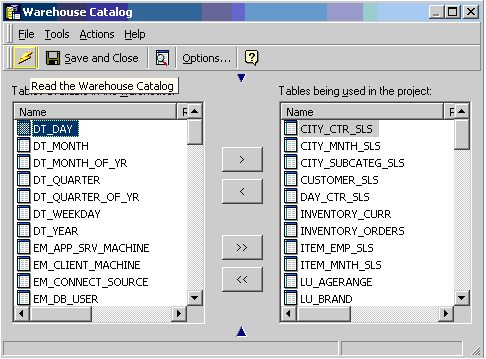
  • Import the tables desired for use in Strategy by running the 'Read the warehouse catalog' to update the warehouse catalog, as shown below:
ka02R000000kWyCQAU_0EM440000002Eqm.jpeg
  • Return to the previous configuration of the Database Instance, by changing the 'Database connection type' from 'Generic DBMS' back to 'HP Neoview 2.0'.

Comment

0 comments

Details

Knowledge Article

Published:

April 13, 2017

Last Updated:

April 13, 2017