EducationSoftwareStrategy.com
StrategyCommunity

Knowledge Base

Product

Community

Knowledge Base

TopicsBrowse ArticlesDeveloper Zone

Product

Download SoftwareProduct DocumentationSecurity Hub

Education

Tutorial VideosSolution GalleryEducation courses

Community

GuidelinesGrandmastersEvents
x_social-icon_white.svglinkedin_social-icon_white.svg
Strategy logoCommunity

© Strategy Inc. All Rights Reserved.

LegalTerms of UsePrivacy Policy
  1. Home
  2. Topics

KB18711: Reports containing the 'User' attribute appear to return duplicate data in MicroStrategy Enterprise Manager


Community Admin

• Strategy


Reports containing the 'User' attribute appear to return duplicate data in MicroStrategy Enterprise Manager

SYMPTOM:
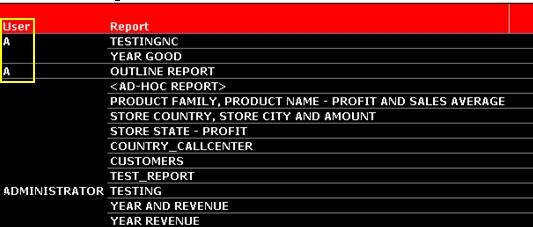
When running a report in Strategy Enterprise Manager with the 'User' attribute, one or more duplicate 'User' elements are reported as shown below:
 

ka04W000000OehLQAS_0EM440000002BIg.jpeg

 
Querying the EM_USER table in the Statistics database shows that the EM_USER_ID, EM_USER_GUID and EM_USER_VER are different, as shown below:
 

ka04W000000OehLQAS_0EM440000002BIo.jpeg

 
STEPS TO REPRODUCE:
Follow the steps below to reproduce this issue: 

  1. Create user 'A' in Strategy Developer
  2. Log as user 'A' and run any report.
  3. Perform a manual load on Strategy Enterprise Manager
  4. Delete user 'A' from Strategy Developer
  5. Create a new user 'A' with the same name as the old one.
  6. Perform a manual data load again using Strategy Enterprise Manager
  7. Run a report in the Strategy Enterprise Manager project with the 'User' and 'Report' attributes on the template.

 
CAUSE:
A possible cause for this issue is that the user in question once existed in the metadata, but was deleted and recreated at some point. When a user is recreated, they receive a a new user object, and thus a new GUID, in the metadata. When the Strategy Enterprise Manager 9.x data load runs, it views the recreated user as a new user, because they have a new GUID, and loads the information into the warehouse under the new GUID.
 
ACTION:
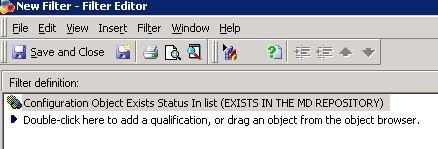
In Strategy Enterprise Manager a filter based on the attribute 'Configuration Object Exists Status' should be added to the report to filter out users which no longer exist in the metadata. The filter can be defined as shown below:
ka04W000000OehLQAS_0EM440000002BIq.jpeg


Note: The data load option 'Update Object deletions' should be run for the deleted user to be marked as deleted in the Strategy Enterprise Manager warehouse. In other words, this option should be run for the above filter to filter out deleted users.


Comment

0 comments

Details

Knowledge Article

Published:

June 7, 2017

Last Updated:

June 7, 2017