SYMPTOM:
A query cube is imported into Strategy from SAP BW and reports are constructed based on the cube. The cube contains SAP variables, which are imported into Strategy as prompts. When executing reports on the cube, prompts are unable to load because of errors retrieving attribute elements.
Strategy Desktop:
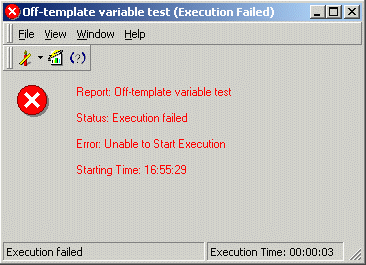
Status: Execution failed
Error: Unable to Start Execution
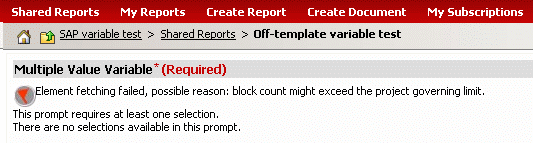
Element fetching failed, possible reason: block count might exceed the project governing limit.
The DSSErrors.log may contain errors such as the following:
2008-06-04 16:55:32.109-05:00 ExecQuery failed. MDX Execution failed. Error type: JCO layer error. JCOStatement.executeQuery failed. java.lang.Exception: Error during MDX Query Execution
Error during Bapi Execution: Unknown error when executing MDX
at com.Strategy.Database.JCO.JCOStatement.executeQuery(JCOStatement.java:85)
. Connection String: N/A;. Connection String: N/A;. SQL Statement: with set as '{..members}'
member . as 'Count({}, INCLUDEEMPTY)'
select {.} on columns
from
Query cube filter:

If this query is run in SAP Business Explorer Analyzer, the user will be asked which item to report on, and the results are broken down by Geography and Time but pre-filtered for only those items. In Strategy, the variable must be presented to the user as a prompt, and to show the prompt, Strategy has to retrieve the attribute elements from the SAP system. Up to and including Strategy 8.1.1, a "schema rowset" call is used to fetch the elements. For this call to succeed, it is sufficient for the attribute to exist in the InfoCube on which the query cube is built. It does not have to be part of the query cube's template.
Beginning with Strategy 8.1.2, large element sets are fetched incrementally from the data source. Incremental fetch requires a count of attribute elements before retrieving any elements, and the only way to obtain this count is by executing an MDX statement against the query cube. MDX cannot query against objects that are not part of the query cube template. Consequently, the query fails and attribute elements cannot be loaded.
ACTION:
All characteristics that are used in SAP variables should be present in either the rows, columns or "free characteristics" sections of the cube definition. If these characteristics are added to the free characteristics section, they will not affect the appearance of the query in Business Explorer Analyzer, but they will be available to Strategy for MDX statements. The cube structure must be updated in the Strategy OLAP cube catalog. Also, if the SAP schema is preloaded, an update schema operation should be performed before running reports against the modified cube.
Here, Item (the characteristic used in the variable) has been added to the free characteristics section:

After updating the cube structure in Strategy, the prompt loads successfully and the report may be executed without issue.

