EducationSoftwareStrategy.com
StrategyCommunity

Knowledge Base

Product

Community

Knowledge Base

TopicsBrowse ArticlesDeveloper Zone

Product

Download SoftwareProduct DocumentationSecurity Hub

Education

Tutorial VideosSolution GalleryEducation courses

Community

GuidelinesGrandmastersEvents
x_social-icon_white.svglinkedin_social-icon_white.svg
Strategy logoCommunity

© Strategy Inc. All Rights Reserved.

LegalTerms of UsePrivacy Policy
  1. Home
  2. Topics

KB18735: If the contents of a textbox span multiple pages, then it will create a page break before its contents are rendered when exporting to ‘PDF’ for a report Report Services document in MicroStrategy Intelligence Server 10.0 or earlier


Community Admin

• Strategy


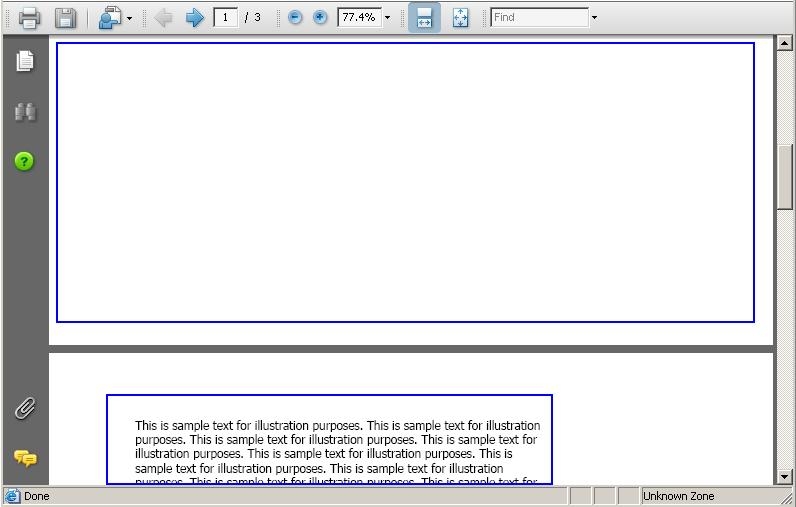
When any user, including the MicroStrategy 'Administrator' user, runs a Report Servcies document that contains a textbox whose contents span multiple pages, then it will create a page break before its contents are rendered when exporting to 'PDF' in MicroStrategy Intelligence Server 9.x or 10.0.

SYMPTOM:
When any user, including the Strategy 'Administrator' user, runs a Report Servcies document that contains a textbox whose contents span multiple pages, then it will create a page break before its contents are rendered when exporting to 'PDF' in Strategy Intelligence Server 9.x or 10.0.
 
STEPS TO REPRODUCE:
Follow the steps below to reproduce this issue in the Strategy Tutorial project:
 

  • Create a new Report Servcies document.
  • Add a textbox to any section of the Report Servcies document, e.g. to the 'Detail Header' section.
  • For the contents of the textbox, make sure it's sufficient to span multiple pages (more than one) and notice that when exporting to 'PDF' format, a page break is performed before the contents of the textbox are displayed, as shown below:
ka04W000001MKpNQAW_0EM440000002BIF.jpeg

CAUSE:
This is a known issue with Strategy Intelligence Server 10.0 and earlier versions.
 
ACTION:
The support of the field breakable by page was added to Strategy version 10.1. Please update to this version or higher to benefit from the fix.
 
WORKAROUND:
If exporting to PDF is not mandatory, the user can run the report Report Services document from Strategy Web and the display will not contain the page breaks, as the concept of 'page' is not applicable within this context.


Comment

0 comments

Details

Knowledge Article

Published:

April 6, 2017

Last Updated:

April 6, 2017