In order to retrieve a list of events registered with the Strategy Intelligence Server similar to what can be obtained using an outline in Strategy Command Manager, use the following VB code sample:
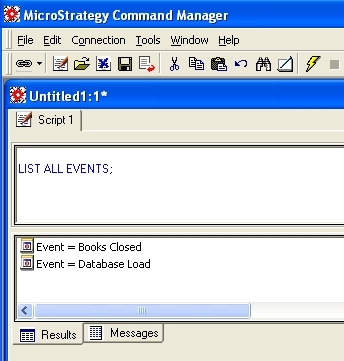
VB Code Sample:
Public Function GetSpecialConfigurationFolderFunc(oSession As IDSSSession, _
                                                  eSpecialFolderType As DSSSpecialConfigurationFolderConstants, _
                                                  oSpecialFolder As IDSSFolder, _
                                                  oError As DSSGuiError) As DSSGUIReturnValue

Const PROCEDURE_NAME As String = "GetSpecialConfigurationFolderFunc"
Dim sSpecialFolderId As String
Dim oRootFolder As IDSSFolder
Dim oObjectInfo As IDSSObjectInfo
Dim bFound As Boolean
Dim bTry As Boolean

    On Error GoTo UnexpectedError

    Select Case eSpecialFolderType
        Case DSSFolderConfigurationDBMS
            sSpecialFolderId = "73F7482D11D3596C60001B8F67019608"
        Case DSSFolderConfigurationProjects
            sSpecialFolderId = "73F7482211D3596C60001B8F67019608"
        Case DSSFolderConfigurationUsers
            sSpecialFolderId = "73F7482611D3596C60001B8F67019608"
        Case DSSFolderConfigurationUserGroups
            sSpecialFolderId = "73F7482511D3596C60001B8F67019608"
        Case DSSFolderConfigurationSecurityRoles
            sSpecialFolderId = "73F7482411D3596C60001B8F67019608"
        Case DSSFolderConfigurationDBRoles
            sSpecialFolderId = "73F7482711D3596C60001B8F67019608"
        Case DSSFolderConfigurationDBConnections
            sSpecialFolderId = "73F7482811D3596C60001B8F67019608"
        Case DSSFolderConfigurationDBLogins
            sSpecialFolderId = "73F7482911D3596C60001B8F67019608"
        Case DSSFolderConfigurationServerDefinitions
            sSpecialFolderId = "73F7482311D3596C60001B8F67019608"
        Case DSSFolderConfigurationScheduleObjects
            sSpecialFolderId = "73F7482C11D3596C60001B8F67019608"
        Case DSSFolderConfigurationEvents
            sSpecialFolderId = "73F7482A11D3596C60001B8F67019608"
        Case DSSFolderConfigurationScheduleTriggers
            sSpecialFolderId = "73F7482B11D3596C60001B8F67019608"
        Case DSSFolderConfigurationTableSources
            sSpecialFolderId = "73F7482F11D3596C60001B8F67019608"
        Case DSSFolderConfigurationPropertySets
            sSpecialFolderId = "73F7482E11D3596C60001B8F67019608"
        Case DSSFolderConfigurationLinks
            sSpecialFolderId = "792B4FA0F39311D3859500C04F6101C4"
    End Select

    `Find the folder in ObjectSource
    Set oSpecialFolder = oSession.ObjectSource.FindObject(sSpecialFolderId, DssTypeFolder)

TryByName:
    If oSpecialFolder Is Nothing Then
        bFound = False
        `we have a problem
        `these folders should always exist, and someone changed the ids
        `lets try to get them by name
        Select Case eSpecialFolderType
            Case DSSFolderConfigurationDBMS
                sSpecialFolderId = "DBMS"
            Case DSSFolderConfigurationProjects
                sSpecialFolderId = "Projects"
            Case DSSFolderConfigurationUsers
                sSpecialFolderId = "Users"
            Case DSSFolderConfigurationUserGroups
                sSpecialFolderId = "User Groups"
            Case DSSFolderConfigurationSecurityRoles
                sSpecialFolderId = "Security Roles"
            Case DSSFolderConfigurationDBRoles
                sSpecialFolderId = "DBRoles"
            Case DSSFolderConfigurationDBConnections
                sSpecialFolderId = "DBConnections"
            Case DSSFolderConfigurationDBLogins
                sSpecialFolderId = "DBLogins"
            Case DSSFolderConfigurationServerDefinitions
                sSpecialFolderId = "Server Definitions"
            Case DSSFolderConfigurationScheduleObjects
                sSpecialFolderId = "Schedule Objects"
            Case DSSFolderConfigurationEvents
                sSpecialFolderId = "Events"
            Case DSSFolderConfigurationScheduleTriggers
                sSpecialFolderId = "Schedule Triggers"
            Case DSSFolderConfigurationTableSources
                sSpecialFolderId = "Table Sources"
            Case DSSFolderConfigurationPropertySets
                sSpecialFolderId = "Property Sets"
            Case DSSFolderConfigurationLinks
                sSpecialFolderId = "Links"
        End Select

        Set oRootFolder = oSession.ObjectSource.Configuration.Root
        For Each oObjectInfo In oRootFolder
            If oObjectInfo.Type = DssTypeFolder Then
                If StrComp(sSpecialFolderId, oObjectInfo.name, vbTextCompare) = 0 Then
                    bFound = True
                    Set oSpecialFolder = oObjectInfo
                    Exit For
                End If
            End If
        Next
    Else
        bFound = True
    End If

    If bFound Then
        GetSpecialConfigurationFolderFunc = DSSSuccess
    Else
        GoTo ErrorHandler
    End If

CleanUp:
    Set oObjectInfo = Nothing
    Exit Function
UnexpectedError:
    Debug.Assert False
    If Err.Number = MDSVR_E_NO_ID And Not bTry Then
        bTry = True `to avoid cycles
        GoTo TryByName
    End If
    Set oError = SetErrorFromErrObjectBAS(Err, PRODUCT_NAME, COMPONENT_NAME, MODULE_NAME, PROCEDURE_NAME, Erl, g_oRouter)
    Err.Clear
ErrorHandler:
    Set oSpecialFolder = Nothing
    GetSpecialConfigurationFolderFunc = DSSError
    GoTo CleanUp
End Function
