EducationSoftwareStrategy.com
StrategyCommunity

Knowledge Base

Product

Community

Knowledge Base

TopicsBrowse ArticlesDeveloper Zone

Product

Download SoftwareProduct DocumentationSecurity Hub

Education

Tutorial VideosSolution GalleryEducation courses

Community

GuidelinesGrandmastersEvents
x_social-icon_white.svglinkedin_social-icon_white.svg
Strategy logoCommunity

© Strategy Inc. All Rights Reserved.

LegalTerms of UsePrivacy Policy
  1. Home
  2. Topics

KB18769: The dashed or dotted line style formatted into a Vertical Line Graph will not be carried over into Flash mode in MicroStrategy Web 9.x.


Community Admin

• Strategy


The dashed or dotted line style formatted into a Vertical Line Graph will not be carried over into Flash mode in MicroStrategy Web 9.x.

SYMPTOM:
Users notice that the dashed or dotted lines style formatted into a Vertical Line Graph will not be carried over into Flash mode in Strategy Web 9.x, like shown in the image below.
 

ka04W000000OhFwQAK_0EM4400000028Yx.jpeg

 
STEPS TO REPRODUCE:
 
Follow the steps below to reproduce this issue:
  • Create a report with Year attribute and Profit metric.
  • View report as graph.
  • Select Vertical Line: Absolute style.
  • Right click the line and select format data line.
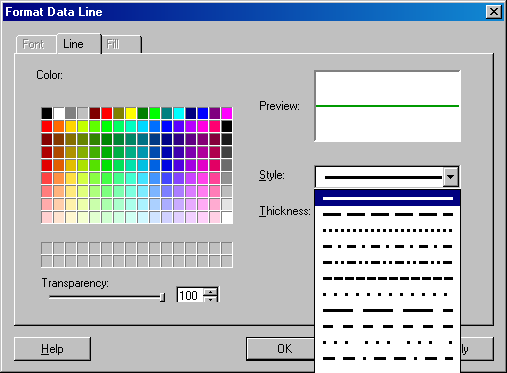
  • Under the line tab, select a dashed or dotted style, like shown in the image below.
ka04W000000OhFwQAK_0EM4400000028Yz.jpeg
  • Save and close.
  • Add to a Report Services document.
  • View in Flash view mode.
  • The line is not dotted nor dashed, in other view modes, it works fine.

CAUSE:
 
This is a limitation on Adobe because there is no native support on Flex for dashed or dotted lines. Adobe's limitation affects Strategy Web 9.x.
 
ACTION:
Strategy will continue to investigate and post updates as soon as they are available.


Comment

0 comments

Details

Knowledge Article

Published:

May 29, 2017

Last Updated:

May 29, 2017