EducationSoftwareStrategy.com
StrategyCommunity

Knowledge Base

Product

Community

Knowledge Base

TopicsBrowse ArticlesDeveloper Zone

Product

Download SoftwareProduct DocumentationSecurity Hub

Education

Tutorial VideosSolution GalleryEducation courses

Community

GuidelinesGrandmastersEvents
x_social-icon_white.svglinkedin_social-icon_white.svg
Strategy logoCommunity

© Strategy Inc. All Rights Reserved.

LegalTerms of UsePrivacy Policy
  1. Home
  2. Topics

KB18839: 'Error(s) occurred while loading report: DSSSQLEngine: converting Report: Unknown error' error appears when creating a metric based in an IF function with a condition involving an attribute in MicroStrategy


Stefan Zepeda

Salesforce Solutions Architect • Strategy


This article notes how attributes have limitations when used directly in metrics without aggregation wrappers.

SYMPTOM:
 
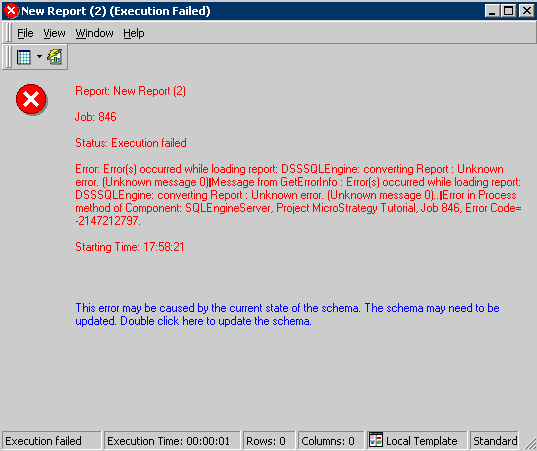
When creating a metric with an IF function that involves an attribute qualification in its condition, users get the following error in Strategy:
Error(s) occurred while loading report: DSSSQLEngine: converting Report: Unknown error
STEPS TO REPRODUCE:
 
Follow the steps below to reproduce this issue using the Strategy Tutorial project:
 

  • Create a metric object with the definition IF(Country@ID = "USA", Profit, Cost) as shown below:
  • Create a report that includes Country and the metric created in the previous step. Run the report. The error described above appears:
ka02R000000kZ5zQAE_0EM440000002VAX.jpeg

CAUSE:
The IF condition allows metrics, constants, comparison and logical operations. By design, attributes cannot be used directly in the condition of the function
 
WORKAROUND:
 
Users can implement the following workaround to use IF functions in combination with conditions based on attributes. Follow the steps below:
 

  • Create a metric that gets the maximum of the desired attribute to include in the condition of the IF function. Specify the attribute form that will be used to define the condition, as shown below:
  • Create a compound metric that uses the IF function in combination with the metric created in the previous step, as shown below:
  • Include the metric in the report, and run it. The metric works as if it where using the attribute condition directly, as shown below:
ka02R000000kZ5zQAE_0EM440000002VAV.jpeg

Comment

0 comments

Details

Knowledge Article

Published:

July 20, 2017

Last Updated:

July 20, 2017