EducationSoftwareStrategy.com
StrategyCommunity

Knowledge Base

Product

Community

Knowledge Base

TopicsBrowse ArticlesDeveloper Zone

Product

Download SoftwareProduct DocumentationSecurity Hub

Education

Tutorial VideosSolution GalleryEducation courses

Community

GuidelinesGrandmastersEvents
x_social-icon_white.svglinkedin_social-icon_white.svg
Strategy logoCommunity

© Strategy Inc. All Rights Reserved.

LegalTerms of UsePrivacy Policy
  1. Home
  2. Topics

KB18933: Feature in MicroStrategy Integrity Manager: HTML output navigation links


Community Admin

• Strategy


Article outline the MicroStrategy Integrity Manager feature, HTML output navigation links

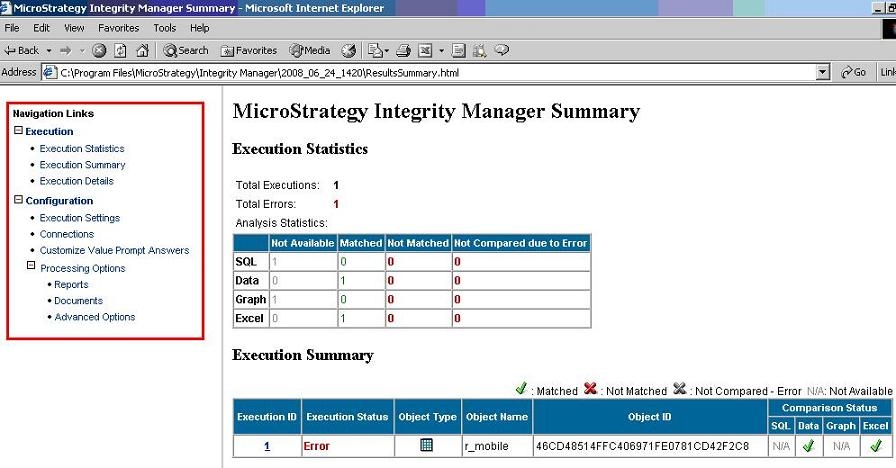
In Strategy Integrity Manager, the html output file includes a section with navigation links in order to make it easier to browse through the different sections of the results summary file.
 
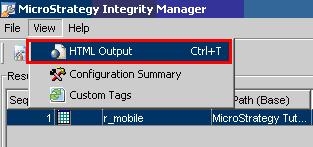
In order to view the results in html output, the user must select the View menu and choose the 'HTML output' option, as shown below:
 

ka04W000000OgarQAC_0EM440000002Eq7.jpeg

 
The navigation links can be found on the left hand side of the results summary html file, as shown below:
 

ka04W000000OgarQAC_0EM440000002EqD.jpeg


Comment

0 comments

Details

Knowledge Article

Published:

June 13, 2017

Last Updated:

June 13, 2017