SYMPTOM:
In Microsoft Analysis Services, it is possible to define what are effectively compound metric calculations as "calculated members" belonging to a cube.
If these calculated members belong to the dimension, they behave transparently like any other measure in the cube. They are imported into Strategy as metrics and they may be used interchangeably with measures derived directly from the underlying database.
Calculated members may also belong to other dimensions, where they are visible to Strategy as attribute elements and may behave more like consolidation elements in Strategy.
In the latter case, certain filtering conditions may cause incorrect values to come back.
For example, three calculated members have been defined to perform calculations similar to Strategy transformations: Current Period, Last Period, Percent Change. They are members of a dedicated dimension other than , so that these calculations may apply to multiple base measures on the template simultaneously.
For example, a Strategy report may be built against this cube with the Time Calculations attribute, Store Sales as the metric, and filters for a specific month (as a reference point for the current and last period calculations).
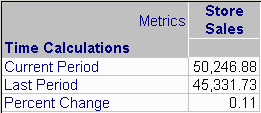
"Percent change" is defined as (Current Period / Last Period) - 1.0, and in fact, 50,246.88 is 11% higher than 45,331.73.
If, however, another filter is added to the report choosing multiple elements for attribute that is not present on the template, the Percent Change value is higher than expected.
Filter = Product Family in (Food, Drink)
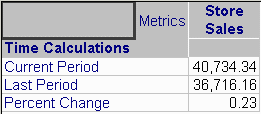
(40,734.34 / 36716.16) - 1.0 = 0.11, or 11%, but the value returned is 23%.
CAUSE:
This issue occurs because one or more filter qualifications exist in the report filter with a filtering attribute is not present on the template and more than one attribute element is chosen.
In the above example, the correct Store Sales value for Current Period, filtered by "Product Family in (Food, Drink)" is the sum of the individual values for Food and Drink. This sum does not exist as a pre-calculated value in the cube, so the aggregation must be performed on-the-fly within the query. This is accomplished by creating a calculated member in the dimension to aggregate over the filtering elements, and then including the calculated member in the slicer axis (WHERE clause).
with set [dim0_filter_elements] as '{[Time Calculations].[All Time Calculations].[Current Period], [Time Calculations].[All Time Calculations].[Last Period], [Time Calculations].[All Time Calculations].[Percent Change]}'
set [dim2_filter_elements] as '{[Product].[All Products].[Food], [Product].[All Products].[Drink]}'
member [Product].[dim2_filter] as 'Aggregate([dim2_filter_elements])'
select {[Measures].[Store Sales]} on columns,
non empty [dim0_filter_elements] on rows
from [Sales]
where ([Time].[1997].[Q3].[7], [Product].[dim2_filter])
According to Microsoft documentation, when a cell involves calculated members in multiple dimensions, the Aggregate function is always evaluated last. That restriction applies to this report. The Percent Change calculated member belongs to the dimension, and the off-template filter requires a calculated member in the dimension using Aggregate. Thus, the percent change evaluates as the sum of the percentages for each filtering element, rather than the percentage of the sums.
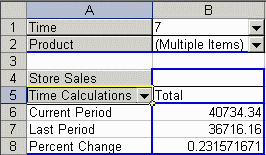
Note that this is not a Strategy-specific limitation. The same unwanted result can be obtained using a Microsoft Excel PivotTable report based on the same Analysis Services cube. The Product filter is replicated in Microsoft Excel by adding the dimension to the page axis, and then selecting multiple elements from the auto-filtering drop-down box.
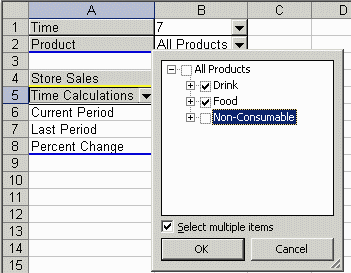
Note that Microsoft Excel displays the same 23% value that Strategy did.
ACTION:
The simplest solution is to add the filtering attribute to the template, on the rows, columns or page axis. The individual values for the filtering elements will be correct.
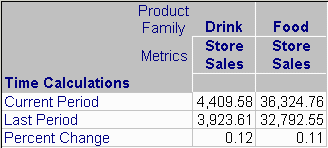
Subtotals, however, are subject to the same issue because the Percent Change calculated member is analogous to a compound metric in Strategy with smart totaling disabled.
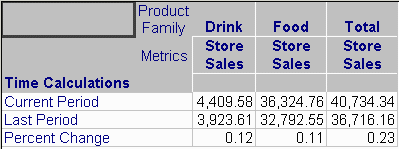
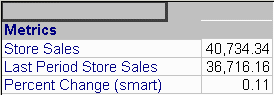
Consequently, if subtotals are required, it will be necessary to recast the calculated members as separate metrics, and then use a smart compound metric for Percent Change. Note that there is no need to create a "Current Period" metric because the base metrics imported from the cube by default retrieve results for the current period of time.

"([Measures].[Store Sales], [Time].CurrentMember.PrevMember)"
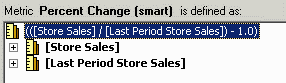
(([Store Sales] / [Last Period Store Sales]) - 1.0)
(Smart Totals are enabled for this metric in the Subtotals/Aggregation tab.)
With separate metrics defined in this way, both scenarios -- an off-template filter with multiple elements, and subtotals across the percentage -- return the expected result.
Further reading
"Understanding Pass Order and Solve Order (MDX)," SQL Server 2005 Books Online (September 2007): http://msdn.microsoft.com/en-us/library/ms145539.aspx
