EducationSoftwareStrategy.com
StrategyCommunity

Knowledge Base

Product

Community

Knowledge Base

TopicsBrowse ArticlesDeveloper Zone

Product

Download SoftwareProduct DocumentationSecurity Hub

Education

Tutorial VideosSolution GalleryEducation courses

Community

GuidelinesGrandmastersEvents
x_social-icon_white.svglinkedin_social-icon_white.svg
Strategy logoCommunity

© Strategy Inc. All Rights Reserved.

LegalTerms of UsePrivacy Policy
  1. Home
  2. Topics

KB18977: What is the difference between setting Login Modes from the Web Preferences versus the Web Administrator page, and how are the changes stored in MicroStrategy Web 9.4.1 and 10.x?


Community Admin

• Strategy


What is the difference between setting Login Modes from the Web Preferences versus the Web Administrator page, and how are the changes stored in MicroStrategy Web 9.4.1 and 10.x?

What is the difference between the Login Mode settings from the Web Preferences page versus the Web Administrator page?
There are two places where users are able to set the login modes in Strategy Web:
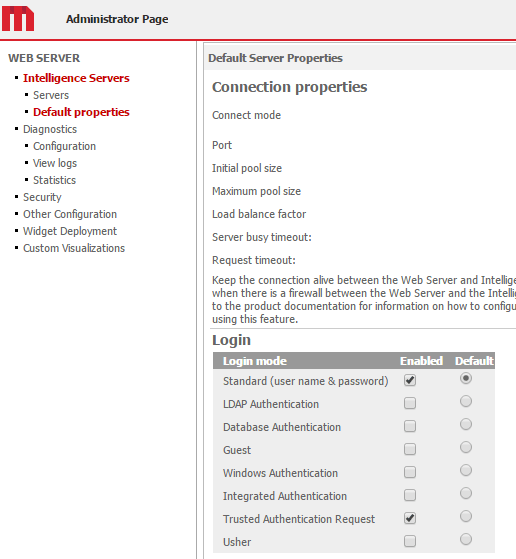
 

  • From the Web Administrator page under Default Properties > Login, as illustrated below:
ka04W000000OdiiQAC_0EM440000002R43.png
  • Under Web Preferences > Project Defaults > Security, as illustrated below:
ka04W000000OdiiQAC_0EM440000002R3y.png

Between these two methods, the settings from the Web Administrator page are considered a default setting. This essentially means that if the settings at the Web Preference level are lost or removed, the web environment will operate based on the Login settings set from the Web Administrator page.
 
If there are specific settings set at the Web Preference level, they will take precedence over the Web Administrator page settings for a given project or projects. As such, it is possible for the settings in these two locations to appear different.
 
Where are the settings stored?
The login mode settings in the Web Preferences are stored on the Web Server machine within certain files depending on where the changes were made. These files are located in the \WEB-INF\xml folder on the Web Server machine. The path on a Windows machine should be similar to C:\Program Files\MicroStrategy\Web ASPx\WEB-INF\xml. The settings are stored in two parameters within these files: defaultloginmode and enabledloginmode. The parameters are modified in the following files based on where the changes were made:
 

  1. If no changes have been made to the Web Preferences or Web Administrator page, the login modes read from the sys_defaults.xml file.
  2. If the user changes the login mode from the Web Administrator page, it gets written to the sys_defaults.properties file.
  3. If the login mode information is changed via Web Preferences and applied to all projects on the Strategy Intelligence Server, a new sys_defaults_INTELLIGENCE_SERVER_NAME.properties file gets created with the parameter information.
  4. If the login information is changed for a specific project via Project Preferences, a sys_defaults_INTELLIGENCE_SERVER_NAME$PROJECT_NAME.properties file gets created with the information.

Comment

0 comments

Details

Knowledge Article

Published:

June 19, 2017

Last Updated:

June 19, 2017