EducationSoftwareStrategy.com
StrategyCommunity

Knowledge Base

Product

Community

Knowledge Base

TopicsBrowse ArticlesDeveloper Zone

Product

Download SoftwareProduct DocumentationSecurity Hub

Education

Tutorial VideosSolution GalleryEducation courses

Community

GuidelinesGrandmastersEvents
x_social-icon_white.svglinkedin_social-icon_white.svg
Strategy logoCommunity

© Strategy Inc. All Rights Reserved.

LegalTerms of UsePrivacy Policy
  1. Home
  2. Topics

KB19043: New feature in MicroStrategy Integrity Manager 8.1.2: Use cache option when running integrity tests


Community Admin

• Strategy


This Technical Note describes how to use cache option when running integrity manager tests in MicroStrategy 10.x. Previously, jobs sent from MicroStrategy Integrity Manager always used the cache (if available), otherwise the jobs were executed against the warehouse. Now users can control the use of caches within MicroStrategy Integrity Manager for each test.

In Strategy Integrity Manager, users have the option to configure the usage of caches for the documents and reports that belong to a test. Previously, jobs sent from Strategy Integrity Manager always used the cache (if available), otherwise the jobs were executed against the warehouse. Now users can control the use of caches within Strategy Integrity Manager for each test.
 
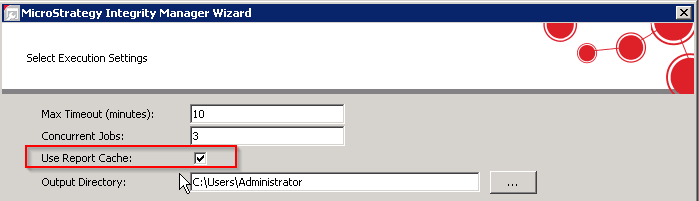
This option is located in the Execution settings page of the test wizard. Once there, the 'use cache' option can be checked or unchecked as desired as shown in the next image. This will apply for all documents or reports selected in the test.
ka04W000000OhoyQAC_0EM440000002J8e.png

For more information of how report caches worked in older versions, refer to the following Strategy Knowledge Base technical note:
 
KB17077 (KB5700-811-2835): How report caches work in Strategy Integrity Manager 8.1.1


Comment

0 comments

Details

Knowledge Article

Published:

April 11, 2017

Last Updated:

April 11, 2017