EducationSoftwareStrategy.com
StrategyCommunity

Knowledge Base

Product

Community

Knowledge Base

TopicsBrowse ArticlesDeveloper Zone

Product

Download SoftwareProduct DocumentationSecurity Hub

Education

Tutorial VideosSolution GalleryEducation courses

Community

GuidelinesGrandmastersEvents
x_social-icon_white.svglinkedin_social-icon_white.svg
Strategy logoCommunity

© Strategy Inc. All Rights Reserved.

LegalTerms of UsePrivacy Policy
  1. Home
  2. Topics

KB19049: How to enable verbose garbage collection information from IBM WebSphere Application Server 6.0 for troubleshooting purposes


Community Admin

• Strategy


How to enable verbose garbage collection information from IBM WebSphere Application Server 6.0 for troubleshooting purposes

The IBM WebSphere Application Server 6.0 verbose garbage collection (GC) log allows administrators to analyze potential memory problems in Strategy Web 9.x, IBM WebSphere Application Server, or a third-party deployed application.
 
To enable the IBM WebSphere Application Server verbose garbage collection log for troubleshooting purposes, follow the steps below:
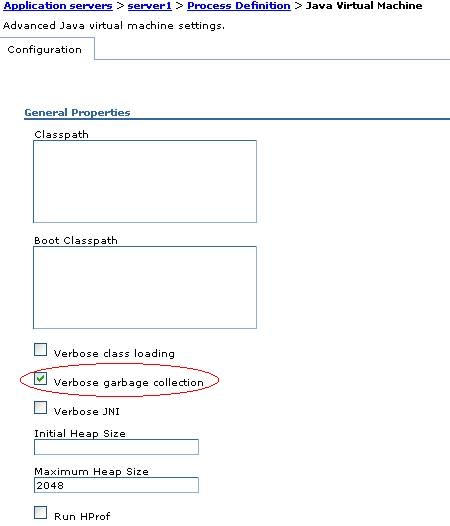
 

  • Navigate to Servers > Application Servers > server1 > Java and Process Management > Process Definition > Java Virtual Machine.
  • Check 'Verbose garbage collection' as shown below:
ka04W000000OdsBQAS_0EM4400000028Xt.jpeg
  • Apply the changes.
  • Save the changes to the master repository.
  • Restart IBM WebSphere Application Server for the changes to take place.
  • The verbose garbage collection output will be saved in native_stdout.log / native_stderr.log

Comment

0 comments

Details

Knowledge Article

Published:

June 15, 2017

Last Updated:

June 15, 2017