EducationSoftwareStrategy.com
StrategyCommunity

Knowledge Base

Product

Community

Knowledge Base

TopicsBrowse ArticlesDeveloper Zone

Product

Download SoftwareProduct DocumentationSecurity Hub

Education

Tutorial VideosSolution GalleryEducation courses

Community

GuidelinesGrandmastersEvents
x_social-icon_white.svglinkedin_social-icon_white.svg
Strategy logoCommunity

© Strategy Inc. All Rights Reserved.

LegalTerms of UsePrivacy Policy
  1. Home
  2. Topics

KB19081: A Set Qualification filter is not applied to the report when the output level for the set (metric) qualification is set to ‘None’.


Community Admin

• Strategy


SYMPTOM:
When a set qualification filter is defined based on a metric, it is seen that the metric qualification is not applied to the report.
 
STEPS TO REPRODUCE:
The steps to reproduce this issue have been explained below using the Strategy Tutorial project.
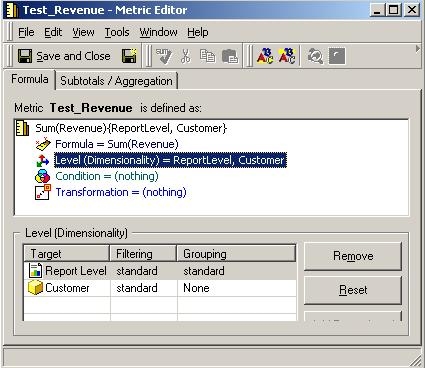
 

  • Modify the definition of the existing metric 'Revenue' to make it a level metric. Add the attribute 'Customer' and set the grouping to 'None'. The definition of the metric is as shown below:
ka04W000000Og10QAC_0EM440000002V2m.jpeg
  • Define a set qualification based on the metric created in step 1 and set the output level to 'None' as shown below.
ka04W000000Og10QAC_0EM440000002V2t.jpeg
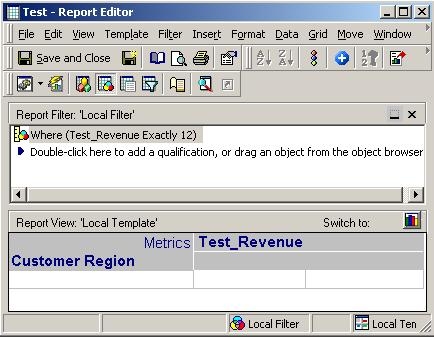
  • Define a report with the attribute 'Customer Region', the metric from Step 1 and the filter from Step 2.
ka04W000000Og10QAC_0EM440000002V2u.jpeg
  • The SQL View of the above report does not show the metric qualification being applied, as seen below:
    select a14. AS CUST_REGION_ID,
    max(a15.) AS CUST_REGION_NAME,
    sum(a11.) AS WJXBFS1
    from a11,
    a12,
    a13,
    a14,
    a15
    where a11. = a12. and
    a12. = a13. and
    a13. = a14. and
    a14. = a15.
    group by a14.
  • When the output level of the metric qualification is changed to 'report level', the metric qualification is applied correctly as seen below:
    Create table ZZMQ00 (
    CUST_REGION_ID BYTE)
    insert into ZZMQ00
    select a14. AS CUST_REGION_ID
    from a11,
    a12,
    a13,
    a14
    where a11. = a12. and
    a12. = a13. and
    a13. = a14.
    group by a14.
    having sum(a11.) = 12.0

    select a14. AS CUST_REGION_ID,
    max(a16.) AS CUST_REGION_NAME,
    sum(a11.) AS WJXBFS1
    from a11,
    a12,
    a13,
    a14,
    pa15,
    a16
    where a11. = a12. and
    a12. = a13. and
    a13. = a14. and
    a14. = pa15. and
    a14. = a16.
    group by a14.

CAUSE:
The above seen behavior is because of the combination of the definition of the metric and the output level of the metric qualification being set to 'None'.
 
As per design, the 'None' selected option calculates the results at the report level ONLY if any of the following is true:
 

  • The metric is a compound metric.
  • The metric's dimensionality is set to report level.
  • The metric's dimensionality is set to nothing.

Otherwise, the metric's dimensionality is used.
 
In the above case, since the metric defined is not a compound metric, and also the metric's dimensionality is not just 'Report level' and also there is some dimensionality set on the metric (i.e. it has report level and the level customer), the metric qualification is calculated at the metric's dimensionality and not at the report level.
 
On the metric dimensionality definition, with 'Grouping' set to 'None', though there is a target level, there is no dimensionality at which the metric qualification pass can be calculated. Hence the engine ignores the metric qualification because it cannot find the dimensionality at which the qualification can be calculated.
 
ACTION:
The output level of the metric qualification can be set to report level to apply the metric qualification on the report. Also, the definition of the metric can be modified such that it meets one of the conditions specified above, for the 'None Selected' output level to apply the metric qualification at the report level.


Comment

0 comments

Details

Knowledge Article

Published:

July 17, 2017

Last Updated:

July 17, 2017