The Strategy SQL Generation Engine can handle nonaggregatable metrics for values such as inventory, where a sum of the fact data is not valid but the beginning or ending value is desired. Consult the following Strategy Knowledgebase article for more details on nonaggregatable metrics.
KB16070: How to define nonaggregatable metrics in MicroStrategy Developer 9.x-10.x
When reporting against OLAP Cube data sources, custom MDX formulas can be used to obtain the same type of result. Metrics based on custom MDX formulas are supported starting with Strategy Engine .
Note: Ideally, the base measures should be defined in the OLAP Cube with the proper First or Last aggregation function. For example, the measure at Day level would simply return the daily value, while Month level would return the value for the last day of the month (assuming it is an end-on-hand metric). If this is the case, there would be no need for a custom MDX formula. These techniques are useful for measures that normally sum up to higher levels, while particular reports should extract the first or last value.
Beginning or ending lookup dimensionality
The first step for beginning or ending lookup dimensionality is to extrapolate downward from the template attribute to the atomic fact level. This is done using the MDX Descendants() function, which returns a set of the children of a particular attribute element at the specified level. With that set in hand, the first or last item in the set may be easily taken.
Beginning lookup (using the Head function):
Sum({ Head(Descendants(.CurrentMember, .), 1) }, .)
Ending lookup (using the Tail function):
Sum({ Tail(Descendants(.CurrentMember, .), 1) }, .)
Even though Sum() is used, Head(<<set>>, 1) and Tail(<<set>>, 1) will return only one item, so there is no true aggregation.
For example, a metric may be defined as follows against SAP BI:
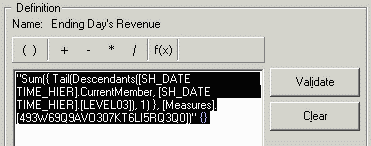
"Sum({ Tail(Descendants(.CurrentMember, .), 1) }, .)" {}
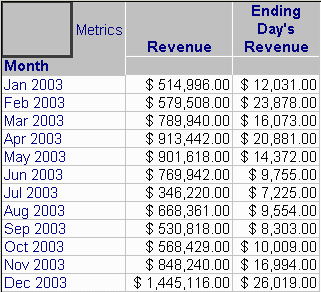
The expression says to begin with the time value for the current row (.CurrentMember), find its children at Day level (.), take the last item of that set (Tail(..., 1)), and then Sum the single value. The results of a report using this metric are as follows:
Note: Microsoft Analysis Services supports a slightly simpler form:
(., Tail(Descendants(.CurrentMember, .), 1).Item(0))
SAP BI does not support this syntax.
Beginning or ending fact dimensionality
Beginning or ending fact dimensionality differs from beginning or ending lookup in that the data displayed correspond to the first attribute element at the fact's level where data exist. That is, if a particular item did not sell on January 1 but did sell on January 2, a beginning-lookup metric would return null for January (since there were no data for January 1) while a beginning-fact metric would return January 2's value.
In MDX, the Descendants() function looks up an element's children based on the hierarchy structure, which is analogous to lookup tables in a Strategy relational schema. To isolate values that have data, the set of Descendants must be filtered using the Filter() function before taking the Head or Tail. The IsEmpty() function returns true if the measure's cell is null; negating that test means that Filter() will return the set of children where data exist.
Beginning fact:
Sum({ Head(Filter({ Descendants(.CurrentMember, .) }, Not IsEmpty(.)), 1) }, .)
Ending fact:
Sum({ Tail(Filter({ Descendants(.CurrentMember, .) }, Not IsEmpty(.)), 1) }, .)
Note: These formulae presuppose that a parent attribute is on the template, or that a single parent attribute element has been chosen in the report filter. If neither condition is met, Descendants() may return an empty set, in which case the formula would return nulls for every row.
